
Common Mistakes Companies Make When Choosing Email Marketing Software

Image Source: depositphotos.com
Every email marketing platform promises roughly the same thing. Better automation. Higher open rates. More conversions. Easier customer communication.
Browse a few vendor websites and you'll quickly notice a pattern: every platform claims to be intuitive, powerful, AI-driven, and trusted by thousands of businesses. Feature comparison pages list hundreds of capabilities, pricing tables look straightforward, and customer testimonials make every solution sound like the obvious choice.
Yet businesses replace their email marketing software surprisingly often.
Sometimes it's because pricing grows faster than expected. Sometimes the platform can't support increasingly complex automations. Sometimes integrations become difficult to maintain. More often than not, however, the problem isn't the software itself. It's the way companies choose it.
Many buying decisions are based on the wrong criteria. Teams compare feature lists instead of business requirements. They prioritize monthly subscription costs over long-term operational expenses. They choose software that looks impressive during a demo but creates unnecessary complexity six months later.
Email marketing software isn't simply another SaaS subscription. Once implemented, it becomes deeply connected to customer data, CRM systems, ecommerce platforms, sales processes, reporting dashboards, and internal workflows. Replacing it later can require weeks of migration work and affect multiple departments.
That's why choosing the right platform is so important.
Mistake #1: Comparing Features Instead of Business Problems
One of the biggest traps in software evaluation is assuming that more features automatically mean a better platform. They don't.
Imagine two companies. The first operates a small ecommerce store selling handmade cosmetics. Their marketing relies on abandoned cart emails, welcome sequences, promotional newsletters, and occasional product launches.
The second company provides B2B consulting services with a six-month sales cycle. Their marketing revolves around lead nurturing, CRM synchronization, webinar registrations, sales notifications, and pipeline tracking.
Both businesses need email marketing software. But they don't need the same software. Unfortunately, many evaluation processes ignore this distinction.
Instead of asking "What problems are we trying to solve?", decision-makers often ask "Which platform has more features?"
That's how comparison spreadsheets grow into massive documents containing hundreds of rows:
- AI email generation
- Landing pages
- SMS marketing
- CRM
- Live chat
- Surveys
- Appointment scheduling
- Website builder
- Social media posting
- Revenue attribution
- Predictive analytics
- Dynamic content
- Heatmaps
- Push notifications
The list continues. The irony is that many of these features will never be used.
Every unnecessary capability increases interface complexity, employee training requirements, implementation time, and often subscription costs. The best platform isn't necessarily the one that does the most. It's the one that solves your specific business problems with the least operational friction. A good evaluation process starts with workflows rather than software.
Ask questions like:
- How do new leads enter the system?
- Which automations generate the most revenue today?
- Which manual tasks consume the most marketing time?
- What reporting do managers actually use?
- Which departments interact with the platform?
Only after answering these questions should feature comparisons begin.
Otherwise you're comparing products before defining the job they need to perform.
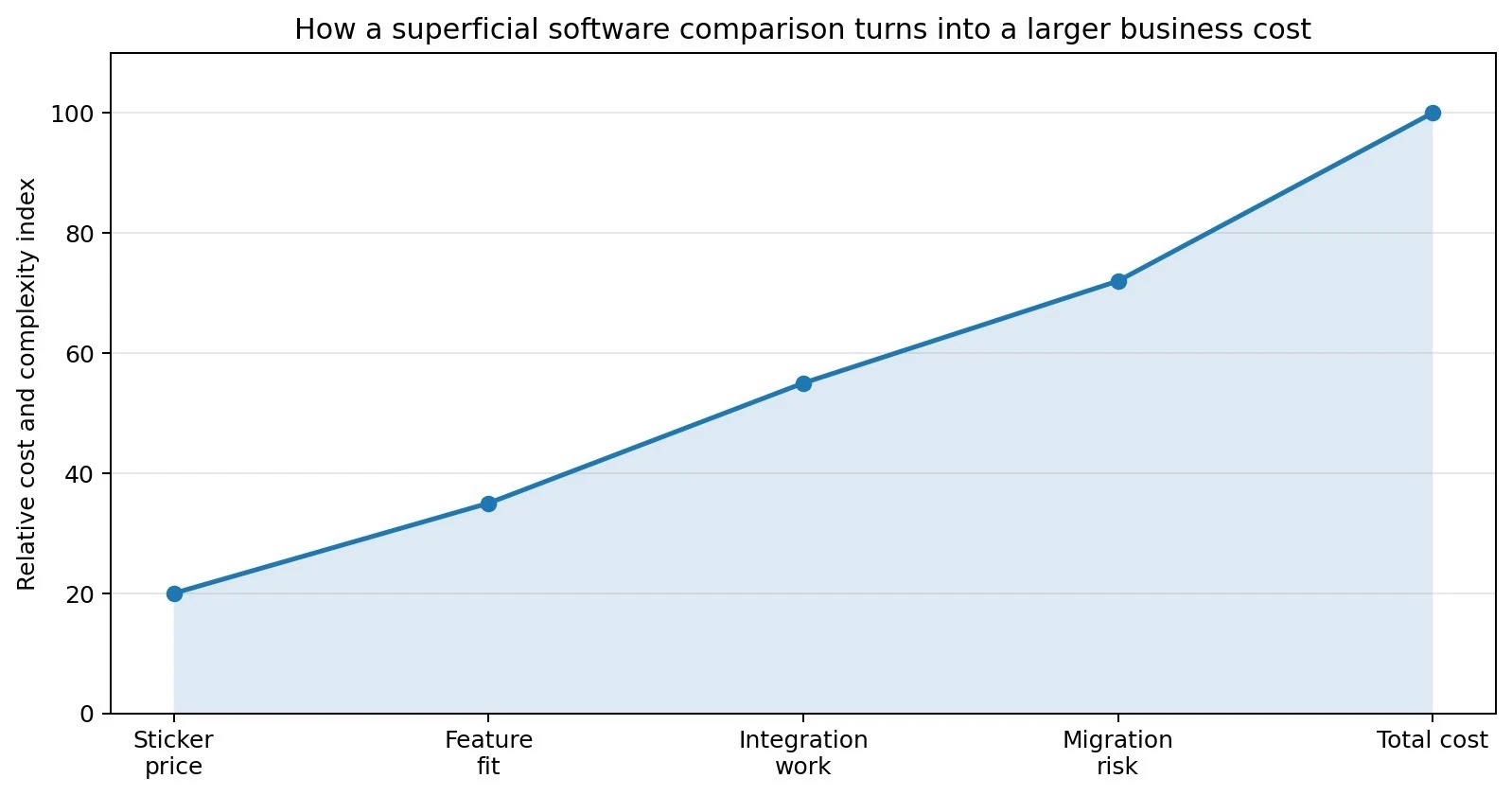
The diagram illustrates a common pattern: companies initially focus almost exclusively on subscription pricing. As implementation progresses, hidden costs begin to appear—workflow redesign, employee training, integration maintenance, migration challenges, and operational inefficiencies. By the time these factors become visible, switching platforms is significantly more expensive than making a better decision upfront.
Mistake #2: Treating Price as the Total Cost
Pricing pages are designed to simplify purchasing decisions. Real ownership costs are rarely simple. Suppose Platform A costs $49 per month while Platform B costs $79. At first glance, Platform A appears to be the obvious winner. But monthly subscription fees represent only one component of the total investment. Businesses often underestimate expenses that appear only after implementation begins. Migration alone can require dozens of working hours. Existing subscriber lists need cleaning. Tags have to be recreated. Automation workflows require rebuilding. Signup forms need replacing. Website integrations must be tested. Reporting dashboards often require modification.
If CRM synchronization is involved, technical teams may spend additional time configuring APIs and resolving data inconsistencies. Employee training creates another hidden expense.
Even if a platform advertises itself as "easy to use," marketers, sales representatives, customer success managers, and administrators all need time to learn new workflows. Productivity usually drops before it improves. Then come integrations. Native integrations are usually straightforward.
Custom integrations rarely are. Businesses frequently discover that connecting accounting software, webinar platforms, internal databases, or proprietary systems requires third-party middleware or custom development work.
Those costs rarely appear on pricing pages. Neither do premium support plans, additional user seats, transactional email limits, dedicated IP addresses, API overages, or advanced reporting modules. Individually, each charge seems manageable. Collectively, they often exceed the monthly subscription itself.
This is why experienced procurement teams evaluate total cost of ownership (TCO) instead of subscription pricing alone.
The cheapest software during procurement isn't always the least expensive after two years of daily use.
In many cases, paying slightly more for software that better fits existing business processes results in significantly lower operational costs over time.
Mistake #3: Choosing Software Before Mapping Your Workflows
Technology should support business processes. Too often, companies expect business processes to adapt to technology instead. This usually happens because software selection starts before anyone documents how work actually flows through the organization.
Consider a fairly typical customer journey. A visitor downloads a whitepaper. Their information enters a CRM. The marketing platform starts a welcome sequence. Sales receives a notification once engagement reaches a predefined threshold. If the lead becomes a customer, onboarding emails begin automatically. Support interactions update customer segmentation. Product usage influences future campaigns. On paper, the journey appears straightforward. In reality, every transition involves systems exchanging data.
If these interactions haven't been documented before software selection begins, evaluating vendors becomes largely theoretical.
Instead of asking: "Can this platform support our workflow?" teams begin asking: "Can our workflow fit inside this platform?"
That's usually the wrong direction.
Mistake #4: Assuming Every Automation Platform Works the Same Way
Automation has become one of the biggest selling points in email marketing software. Nearly every vendor advertises visual workflow builders, behavioral triggers, audience segmentation, and AI-powered personalization. On paper, the capabilities often look remarkably similar. In practice, they're not.
Two platforms may both claim to support abandoned cart emails, welcome sequences, and lead nurturing, yet the way those automations are built can differ dramatically. One platform might allow dozens of conditions, nested branches, and flexible goals, while another only supports basic linear workflows. These differences rarely appear on feature comparison pages. Instead, they become obvious only after marketers begin building campaigns. Imagine your business wants to create a relatively common automation: A visitor downloads an ebook. If they don't open the first email, send a reminder two days later. If they open but don't click, send different content. If they click, notify Sales. If they become a customer, immediately stop the lead nurturing sequence and start onboarding instead. That sounds straightforward.
Yet not every automation builder can accomplish it cleanly. Some require multiple disconnected workflows. Others depend on external integrations. Some don't support automation goals or dynamic branching at all.
As workflows become more sophisticated, these limitations compound.
Marketing teams often end up creating unnecessary workarounds that are difficult to maintain, difficult to troubleshoot, and even harder to explain to new employees.
The lesson isn't to choose the platform with the most advanced automation builder.
It's to test whether your own automations can actually be recreated before making a purchasing decision.
A free trial should never be used only to send newsletters. It should be used to rebuild one or two of your most important workflows. If that process feels frustrating during the trial, it probably won't improve after implementation.
Mistake #5: Looking at the Number of Integrations Instead of Their Quality
Software companies love publishing impressive numbers. Unfortunately, they don't tell the whole story.
An integration directory can contain hundreds of applications while still missing the few integrations your business actually depends on. Even when an integration exists, its quality can vary considerably. Some connections synchronize data instantly. Others update only every few hours. Some transfer every customer attribute.
Others synchronize only email addresses. Some support two-way synchronization. Others only push information in one direction. These differences become especially important once multiple departments begin relying on the same customer data. Imagine that your sales team updates a lead's status inside the CRM. If the email platform receives that information immediately, marketing automations can react accordingly. Promotional campaigns stop, onboarding emails begin, and segmentation remains accurate.
If synchronization happens once every 24 hours, customers may continue receiving irrelevant emails long after their status has changed. The problem isn't necessarily the platform. It's the assumption that all integrations work equally well simply because they exist. When evaluating software, ask practical questions instead.
How often does the integration synchronize?
Which customer fields are transferred?
Is synchronization one-way or bidirectional?
Does the integration require additional middleware?
How reliable is the connection under heavy workloads?
The answers matter far more than the total number displayed on the vendor's website.
Mistake #6: Choosing Based on Reviews Instead of Your Own Requirements
Online reviews are valuable. They provide firsthand experiences, highlight recurring problems, and often reveal strengths that marketing pages overlook. But reviews also have an important limitation. They reflect someone else's priorities. A feature praised by an ecommerce business may be completely irrelevant to a SaaS company. This is why review scores should be treated as a starting point rather than a final decision.
Instead of asking, "Which platform has the highest rating?", ask a different question: "Which platform best matches the way our business actually works?"
A practical way to answer that question is to compare several solutions side by side instead of evaluating only one vendor at a time. Comparison resources can help identify differences in pricing models, automation capabilities, integrations, ease of migration, and long-term scalability. For example, this overview of the best ActiveCampaign alternatives provides a useful comparison of several well-known email marketing platforms without focusing on a single solution. Reading comparisons like this alongside vendor documentation gives a much more balanced picture than relying solely on product marketing or customer reviews.
The best software isn't necessarily the one receiving the most praise online. It's the one that supports your workflows with the fewest compromises.