
4 Best Enterprise VPN Solutions 2026 Review: Secure Remote Access Tools Compared

Remote work isn’t slowing down, and attackers know it. Sixty percent of breaches now begin with stolen remote-access credentials, costing businesses an average $4.45 million. The antidote is an enterprise VPN built for today’s always-online workforce.
This guide compares four proven platforms—from a privacy-first, no-logs service to Cisco’s global heavyweight—so you can line up encryption strength, admin simplicity, and budget with your risk profile. A side-by-side table, plain-English reviews, and a quick decision cheatsheet will help you pick the right fit in minutes.
Why modern enterprises need more than a legacy VPN
Yesterday’s VPNs were built for a world where a few road-warriors dialed in at 5 p.m. Today entire companies stay online all day, juggling SaaS apps, cloud workloads, and café Wi-Fi. Attackers noticed. According to IBM’s 2023 Cost of a Data Breach report, the average incident now costs $4.45 million—a record high and a 15 percent jump in three years.
The problem goes beyond volume; it is about trust. Traditional VPNs drop every authenticated user onto the corporate network, giving them a universal key to move laterally. Ransomware crews exploit that flat access model.
Gartner forecasts that 70 percent of new remote-access deployments will use ZTNA by 2025, up from under 10 percent in 2021. Connections are brokered per application, devices are checked in real time, and sensitive assets stay invisible to outsiders.
Performance expectations keep climbing. Video calls, interactive dashboards, even VR training struggle with the extra hops of an aging IPsec tunnel. New protocols such as WireGuard cut handshake overhead and deliver gigabit-class throughput, giving teams security without coffee-break wait times.
Remote access is moving toward speed, segmentation, and continuous verification. The four platforms you will see next embrace that future, and each one leaves the old castle-and-moat approach behind.
How we evaluated each VPN
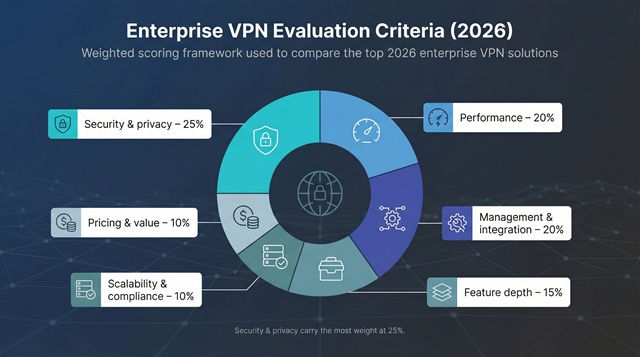
Security & privacy: 25 percent
We began with the non-negotiables: AES-256 or ChaCha20 encryption, multi-factor authentication, and independently audited logging policies. Platforms that add zero-trust controls such as device-posture checks or app-level rules scored higher.
Performance: 20 percent
Slow tunnels drain productivity. We looked for modern protocols and a broad routing footprint. WireGuard support was key; tests by VPNScout.io show it delivers two to three times the throughput of legacy OpenVPN while cutting latency to single-digit milliseconds.
Management & integration: 20 percent
Admins need to add users, enforce policies, and pull audit logs in minutes, not hours. We verified single sign-on with Azure AD or Okta, role-based controls, and clean dashboards that shorten ramp-up time.
Feature depth: 15 percent
Dedicated IPs, split tunneling, web-gateway filtering, and clientless app portals all solve day-to-day headaches and prepare your stack for tomorrow.
Scalability & compliance: 10 percent
Can the service stretch from 25 users to 25,000 without a weekend rebuild? Does it carry SOC 2 or ISO 27001 seals? Enterprises rely on these details.
Pricing & value: 10 percent
Transparent per-user pricing matters, but so does total cost of ownership. We weighed subscription fees against hidden costs such as gateway appliances, minimum seat counts, and the admin hours each platform saves.
The weightings underline a simple truth: you can add features later, yet you cannot retrofit strong security or acceptable speed. Next, you will see how the top four measure up.
Quick comparison: 2026 leaders side by side
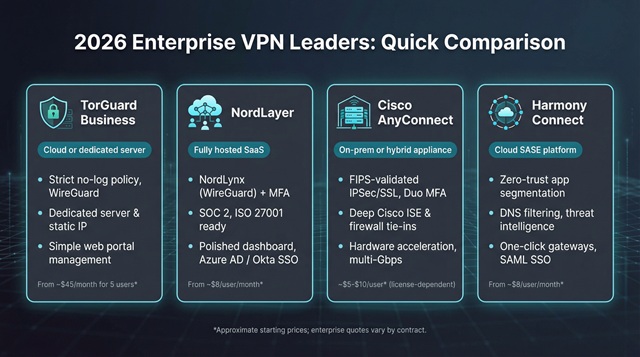
Before we dive into individual reviews, it helps to see the contenders next to each other. The table below distills the essentials—deployment style, standout security, admin experience, real-world speed notes, and the entry-level price you will pay. Scan it, find the row that matches your environment, then keep reading for the deeper story.
|
VPN solution |
Deployment model |
Security highlight |
Admin & SSO tools |
Performance note |
Starting price* |
|
TorGuard Business |
Cloud or dedicated server |
Strict no-log policy, WireGuard encryption |
Simple web portal, manual user adds |
50+ countries; strong burst speed on WireGuard |
$45 / month for 5 users |
|
NordLayer |
Fully hosted SaaS |
NordLynx (WireGuard) plus MFA, SOC 2 |
Polished dashboard, Azure AD / Okta SSO |
<10 % speed loss in tests; private gateways optional |
$8 per user per month |
|
Cisco AnyConnect |
On-prem or hybrid appliance |
FIPS-validated IPsec/SSL, Duo MFA |
Deep tie-ins with Cisco ISE & firewalls |
Hardware acceleration reaches multi-Gbps |
~$5–$10 per user (license dependent) |
|
Harmony Connect |
Cloud SASE platform |
Zero-trust app segmentation, DNS filtering |
One-click gateway build, SAML SSO |
35+ global PoPs, WireGuard tunnels |
$8 per user per month |
*Published annual pricing or closest transparent tier. Large-enterprise quotes vary.
Keep these figures in mind as we compare strengths and trade-offs. A number on a chart never tells the whole story, but it sets the stage for a smarter shortlist.
1. TorGuard Business: privacy first, always on
If your team handles material that must stay off every radar (think legal briefs, investigative journalism, or confidential product blueprints), TorGuard is the digital equivalent of drawing the blinds.

TorGuard Business VPN enterprise solutions page screenshot
Unlike consumer VPNs that send thousands of strangers through the same exit nodes, every TorGuard Business plan includes at least one dedicated server and static IP. No one outside your organization ever touches that address, so whitelisting corporate services and avoiding reputation blacklists becomes painless.
Security is uncompromising. Tunnels run on WireGuard or OpenVPN, wrapped in AES-256 encryption and perfect-forward secrecy. TorGuard markets itself as an anonymous vpn service with a strict zero-logs policy, explicitly stating that it never stores browsing history, connection timestamps, or personal data, so there is simply no session data to subpoena or leak. For privacy-centric industries, that peace of mind outweighs flashy extras.
Administration stays lightweight. A plain-spoken web portal lets you create user accounts, assign servers, and rotate credentials in minutes. There is no SSO complexity here; TorGuard opts for simplicity over deep directory hooks, and that means zero integration headaches. Need another server in Frankfurt for the M&A team? Click, deploy, done.
Performance surprises many first-timers. Because your instance is not congested by the public, WireGuard throughput often rivals direct ISP speeds, and the network spans more than 50 countries, so global staff see low latency.
The pricing model is friendly to small teams: a five-user starter bundle lands just under $45 a month, and scaling up only means adding more seats or servers, with no hidden gateways and no appliance upsell.
TorGuard is not a Swiss-army VPN. You will not find device-posture checks, elaborate dashboards, or built-in web filtering. What you get instead is a narrowly focused service that keeps outsiders out and leaves virtually no paper trail behind. For organizations where privacy is policy, that trade is more than fair.
2. NordLayer: smooth security for growing teams
Some VPNs feel like an IT project. NordLayer feels like signing up for a productivity app. You create an account, pick a region for your first private gateway, invite colleagues with two clicks, and within fifteen minutes your company has an encrypted backbone.
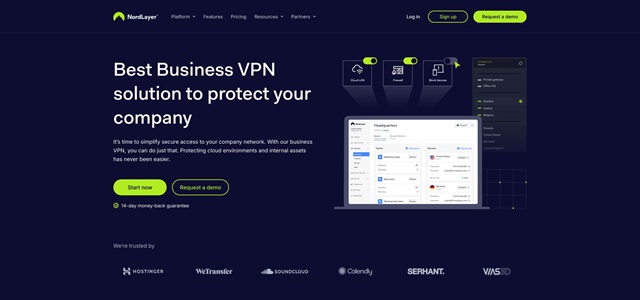
NordLayer business VPN product page screenshot
That ease is backed by solid engineering. NordLayer’s NordLynx protocol rides on WireGuard for near-native internet speeds, while mandatory multi-factor authentication and role-based access keep credentials out of phishing nets. Need a fixed IP for payroll software? Spin up a dedicated gateway and lock it down to finance staff only.
Management polish sets NordLayer apart. The web console looks like a modern SaaS dashboard, not router firmware. You can view active sessions in real time, revoke a compromised device instantly, and funnel audit logs to your SIEM without custom scripts. Single sign-on connects to Azure AD, Okta, or Google Workspace, so users log in once and stay protected everywhere.
Compliance boxes check themselves. SOC 2 Type II and ISO 27001 reports stand ready for procurement teams, and a HIPAA addendum is available if you handle patient data. Pricing is transparent: Basic at eight dollars per user, Advanced at fourteen, and an Enterprise tier for larger rollouts. No appliance costs and no bandwidth caps hide in the fine print.
Drawbacks exist. The Enterprise plan starts at fifty seats, so micro-startups may overbuy. Linux users work from a command-line client rather than a GUI. And while thirty-plus gateway regions cover every major market, niche geographies can lag behind larger consumer VPN networks.
For companies scaling from a handful of remote employees to hundreds, NordLayer hits the sweet spot: cloud simple, security-forward, and priced so finance signs off on the first pass.
3. Cisco AnyConnect: the enterprise workhorse
Ask a Fortune 500 network admin what keeps thousands of employees online and you will hear one name more than any other: Cisco AnyConnect. It is not glamorous, but it is proven, deeply configurable, and backed by Cisco’s global support team.
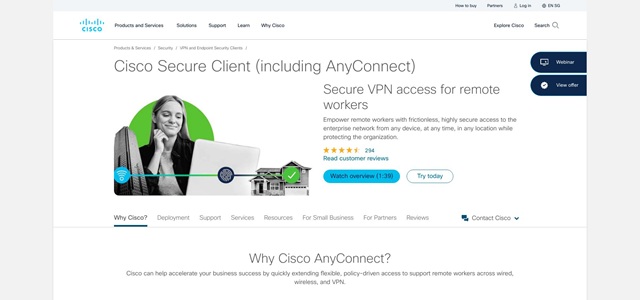
Cisco AnyConnect secure remote access product page screenshot
Security starts at the hardware. AnyConnect terminates on ASA or Firepower appliances that push traffic through the same threat-prevention engines guarding your data center. Paired with Duo multi-factor authentication and certificate checks from Cisco Identity Services Engine, a stolen password alone gets attackers nowhere.
Scalability is its signature strength. A single high-end head-end handles tens of thousands of concurrent sessions, and clustering turns that into carrier-grade capacity. If a gateway fails, users shift to the next node with no ticket flood to the help desk.
Admins appreciate the control. Need to block access when a laptop’s antivirus is out of date? Write a posture rule. Want to split-tunnel Zoom while forcing everything else through inspection? A few lines in the policy editor handle it. Logs stream straight into Splunk or SecureX for real-time analytics, so compliance teams never fly blind.
There are trade-offs. Deploying the first appliance, along with the required licenses, costs more than a cloud subscription. The AnyConnect client looks spartan beside slick SaaS rivals, and casual IT generalists may find the policy syntax dense.
For organizations already invested in Cisco’s ecosystem, AnyConnect feels like part of the core network rather than an add-on. The learning curve buys you granular security, dependable TAC support, and uptime metrics that let CIOs sleep at night.
If your remote workforce numbers in the thousands, or if regulators demand FIPS-validated encryption delivered by hardware you own, Cisco AnyConnect remains the safe and smart bet.
4. Harmony Connect: zero trust in a single click
For teams that skipped the on-prem era and moved straight to the cloud, Harmony Connect (formerly Perimeter 81) feels instantly familiar. You open a browser, pick a region for your gateway, set app-level rules, and you are live—no hardware, firmware updates, or weekend change windows.
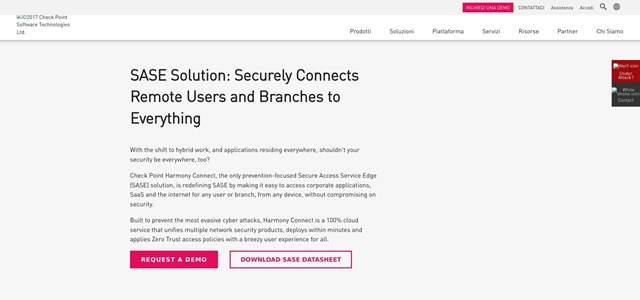
Check Point Harmony Connect SASE zero trust platform screenshot
Security is layered, not bolted on. Every tunnel uses WireGuard or OpenVPN with AES-256 encryption, yet the real protection happens above the transport. Harmony brokers access per application, so marketing never sees engineering subnets, and contractors can reach one web app through an agentless portal without touching the rest of the network.
Threat intelligence comes from Check Point’s large research team. DNS filtering, IPS signatures, and real-time reputation feeds block malware and phishing attempts before packets reach user laptops. It is the kind of integrated stack that once required three vendors and a nest of virtual appliances.
Management mirrors modern SaaS. The dashboard shows live sessions, policy hits, and risky domains in plain English. Single sign-on works with Okta, Azure AD, and Google; an open API lets you script user provisioning or export logs to any SIEM you trust.
Pricing sits in familiar SaaS territory: about eight dollars per user for the Starter tier, with extras like dedicated gateways and priority support on higher plans. Because bandwidth scales automatically in the cloud, you never budget for appliances or pay for head-end upgrades.
There are limits. Network architects who want sub-interface routing or custom NAT rules will find guardrails, because Harmony hides that complexity. And yes, you are trusting an external cloud, one with a 99.99 percent SLA, to stay up and keep your logs safe.
For fast-growing, cloud-native businesses that want zero-trust controls without building a zero-trust project, Harmony Connect may be the simplest path to “secure by default.”
Conclusion
Each of the four platforms above delivers strong encryption, modern protocols, and admin features that beat yesterday’s legacy VPNs. Match their respective strengths—privacy focus, SaaS simplicity, hardware-anchored control, or integrated zero-trust security—to your organization’s culture and risk profile, and secure remote access will follow.