
How to Recover Deleted Texts and Photos from Your iPhone in 2025

Image Source: depositphotos.com
Accidentally deleted a text message or an important photo on your iPhone? You’re not alone. Whether it’s a slip of the finger, a failed iOS update, or a factory reset gone wrong, losing valuable data is frustrating — and often feels irreversible.
The good news is that recovery is often possible. In this guide, we’ll explore traditional iPhone recovery methods (iCloud and iTunes) and then show you why Gbyte Recovery, a modern third-party data recovery software for iPhone, has quickly become the go-to solution for many users in 2025.
Why iPhone Data Recovery Can Be Tricky
Apple’s closed ecosystem is excellent for security, but it can make recovery more complex. Traditional recovery options rely heavily on backups, which aren’t always available or up-to-date. Common challenges include:
- No Backup Exists – Many users don’t enable iCloud or forget to back up with iTunes.
- Outdated Backups – Even if you have a backup, it may not contain the files you’ve just lost.
- Data Overwrite Risk – Restoring from a backup can replace your current data with older files.
- Limited App Support – Native recovery methods don’t retrieve chat histories from apps like WhatsApp, LINE, or Messenger unless they were backed up separately.
This is where choosing the right recovery approach becomes crucial.
Traditional Recovery Methods and Their Limitations
1. iCloud Backup Restore
If you have an iCloud backup, you can restore your iPhone to a previous state. However, this requires a recent backup, and the process restores the entire device, risking the loss of new data. You also can’t select specific files to recover; everything in the backup is restored.
2. iTunes (or Finder) Backup Restore
Similarly, iTunes or Finder can restore your iPhone from a local backup stored on your computer. Like iCloud, this method requires a full restore of your device, and you can’t choose specific files. This method also requires a computer, making it less convenient if you need quick access to your data.
Where Traditional Methods Fall Short
While iCloud and iTunes restore methods can be effective, they often fall short in real-life situations. Many users don’t have an up-to-date backup, or the backup doesn’t include the data they need. Additionally, both methods risk overwriting existing data and don’t allow for selective recovery. This is where modern recovery tools like Gbyte Recovery provide a more flexible, efficient, and private solution for recovering lost data without the need for backups or a full restore.
Gbyte Recovery: A Modern Alternative
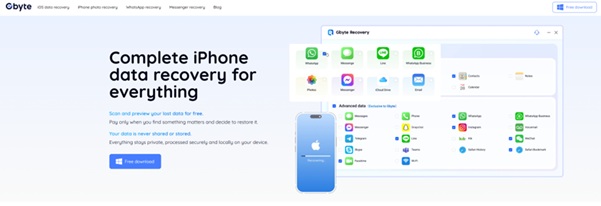
Gbyte Recovery is a cutting-edgedata recovery software that works differently from traditional methods. Instead of relying solely on backups, it performs on-device deep scanning to find recoverable data in your iPhone’s internal storage — including system snapshots, caches, and app data remnants.
Key Advantages Over Traditional Methods:
- No Backup Needed – Works even if you’ve never synced with iCloud or iTunes.
- Selective Recovery – Restore only what you want (texts, photos, app data) without affecting existing files.
- Third-Party App Support – Recovers WhatsApp, LINE, Messenger, and Instagram chats.
- Privacy-First – All recovery happens locally; no files are uploaded to external servers.
- Broad Compatibility – Fully supports iOS 16, 17, and 18, optimized for iPhone 15/16 models.
What Gbyte Can Recover
- Deleted text messages (including deleted messages recovery for WhatsApp and iMessage)
- Photos and videos (even after being removed from the “Recently Deleted” folder)
- Contacts, call logs, Safari history, and bookmarks
- App-specific files from social, messaging, and productivity apps
- Voice memos, PDFs, and other document formats
Comparison: Traditional vs Gbyte Recovery
|
Feature / Tool |
Gbyte Recovery |
iCloud Restore |
iTunes Restore |
|
Needs Backup |
❌ No |
✅ Yes |
✅ Yes |
|
Selective Recovery |
✅ Yes |
❌ No |
❌ No |
|
Keeps Current Data |
✅ Yes |
❌ No |
❌ No |
|
Third-Party App Support |
✅ Yes |
❌ No |
❌ Limited |
|
Privacy Protection |
✅ 100% Local |
⚠️ Cloud Sync |
✅ Local (Encrypted Optional) |
|
Recovery Speed |
⚡ Fast (minutes–30 mins) |
🐢 Slow (full restore) |
⏳ Medium |
|
OS Compatibility |
iOS 16–18 (incl. iPhone 15/16) |
Any supported iOS |
Any supported iOS |
When to Choose Gbyte Over Traditional Tools
Choose iCloud/iTunes if:
- You have a very recent backup that includes the lost data
- You don’t mind overwriting your phone
Choose Gbyte Recovery if:
- You have no backup
- You only need certain files back
- You need deleted messages recovery without touching current files
- You value speed, simplicity, and privacy
How to Recover Deleted Texts and Photos with Gbyte Recovery
- Download & Install – Get Gbyte Recovery for Windows/Mac from the official site and complete setup.
- Connect iPhone – Plug in via Apple ID, unlock the phone, and tap Trust This Computer.
- Prepare Device – Keep the battery above 20% and avoid using the phone during scanning to prevent overwrites.
- Choose Data Types – Select Photos & Videos, Messages, or any other categories you need.
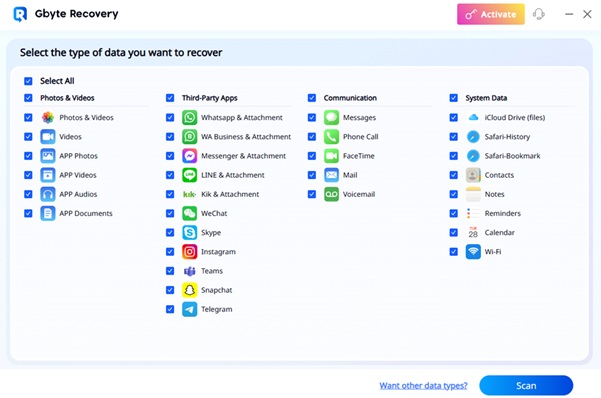
- Pick Scan Mode – Use Smart Scan for recent deletions; choose Deep Scan for older or harder-to-find items.
- Run the Scan – Let it analyze storage/snapshots; don’t disconnect the cable.
- Preview Results – Filter by type/date; open thumbnails or message snippets to verify content.
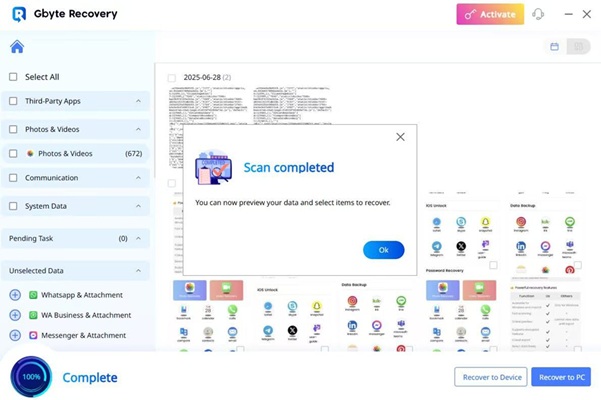
- Recover – Restore back to the device or export to computer (e.g., JPG/HEIC for photos, CSV/PDF for messages), then create a fresh backup.
Real-World Example
When Lisa, an iPhone 15 Pro user on iOS 18, accidentally deleted over 200 photos and an important iMessage thread, she discovered her last iCloud backup was weeks old. iTunes wasn’t an option since she had no recent computer backups.
By using Gbyte Recovery’s Deep Scan mode, she recovered 195 photos and the complete message thread in under 25 minutes — without overwriting her existing files or restoring the whole phone.
Final Thoughts
Recovering deleted texts and photos from your iPhone doesn’t have to be a hopeless task. Traditional methods like iCloud and iTunes work if you have a recent backup, but they lack flexibility and can put your current data at risk.
If you want more control, speed, and compatibility — especially with third-party apps — Gbyte Recovery is the smarter choice. With its ability to work without backups, perform selective restores, and protect your privacy, it’s an essential tool for any iPhone owner in 2025.
Whether you need photo restoration or urgent deleted messages recovery, Gbyte gives you the best chance of getting your data back quickly and securely.