
How to Use an AI PDF Translator for Technical Documentation
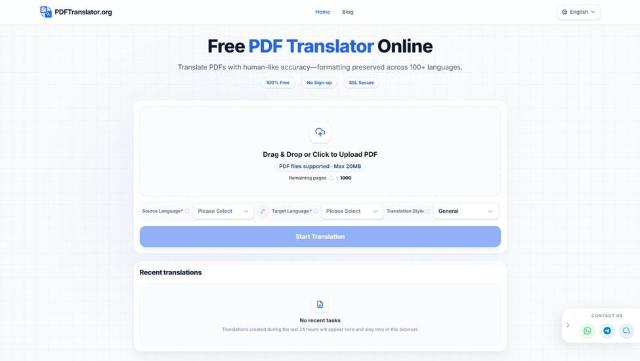
Technical documents such as runbooks, standard operating procedures, and maintenance manuals help teams work safely across countries. A PDF Translator can give global teams faster access to the same information without rebuilding files manually.
Speed is not enough, however. A mistranslated command, warning, or system status can create operational risk. An online PDF translator should therefore be used with terminology management, technical review, and final approval.
Why Technical PDF Translation Needs Care
Technical PDFs often contain numbered procedures, screenshots, commands, tables, diagrams, warnings, and troubleshooting steps. These elements depend on their original layout.
If a warning becomes separated from the relevant step or table columns shift, users may apply the wrong settings. Translation accuracy therefore includes both wording and document structure.
Technical Terms Must Be Consistent
Terms such as “failover,” “rollback,” “latency,” and “privilege” have specific meanings. A natural-sounding but incorrect translation can confuse engineers and support teams.
Create a glossary for product names, system components, abbreviations, error states, and repeated technical terms. Include the approved translation and any terms that must remain unchanged.
Layout Is Part of the Instruction
Indentation, warning boxes, tables, and code blocks communicate meaning. After translation, confirm that headings, lists, tables, images, and warnings remain connected to the correct content.
Prioritize Important Documents
Not every file needs immediate translation. Prioritize documents based on frequency of use and the consequences of misunderstanding them.
Common priorities include:
- Incident response runbooks
- Standard operating procedures
- Maintenance manuals
- Deployment and rollback instructions
- Security procedures
- Business continuity plans
- Troubleshooting guides
- Compliance instructions
Also identify the target reader. Experienced engineers may need precise terminology, while new employees may need additional explanations.
Prepare the Source PDF
Before uploading a file, confirm that it is current, complete, and text-based. PDFTranslator currently supports PDFs with selectable text. It does not provide OCR or directly process scanned or image-only PDFs.
Also check for:
- Outdated instructions
- Duplicate sections
- Broken links
- Unclear screenshots
- Incorrect page numbering
- Unapproved comments
- Missing document ownership
PDFTranslator.org accepts files up to 20MB. Larger manuals can be split by logical sections such as installation, configuration, monitoring, security, or troubleshooting.
Protect Commands and Configuration Values
Commands, API parameters, file paths, environment variables, log messages, and code should normally remain unchanged.
Review these elements character by character:
- Capitalization
- Hyphens and underscores
- Quotation marks
- Directory separators
- IP addresses and port numbers
- Variable names
- Version numbers
- Units and time intervals
Translate the explanation around a command, but keep the executable content clearly separated and unchanged.
Review Procedures and Warnings
After translation, check that:
- Steps remain in the correct order
- Sub-steps retain their indentation
- Prerequisites appear before the procedure
- Expected results match the correct action
- Recovery instructions follow the relevant failure
- Warnings remain prominent
- Tables and captions match the correct content
- Screenshots remain close to their explanations
Text expansion may cause labels to overlap images or diagram boxes. Correct these issues before publication.
Use Human Review for High-Risk Content
AI translation can provide a useful first draft, but review should match the consequences of an error.
A practical process includes:
- A language reviewer checks meaning and terminology.
- A technical reviewer checks commands and procedures.
- The document owner approves the final version.
Critical procedures should also be tested in a safe environment. The reviewer should confirm that users can identify prerequisites, complete each step, understand the expected result, and recover from errors.
Protect Sensitive Information
Technical PDFs may contain network details, customer data, credentials, or security architecture. Remove passwords, access tokens, private keys, and unnecessary confidential information before uploading.
PDFTranslator.org uses SSL-secured processing and states that files are automatically deleted within 24 hours after translation. Organizations should still follow their own security policies, contracts, and regulatory requirements.
Highly restricted documents may require an approved internal system or a specific enterprise translation provider.
Build a Repeatable Workflow
PDFTranslator.org supports more than 100 languages and offers up to 1,000 free pages per calendar month without registration or a credit card.
A practical workflow is:
- Confirm the source version and target audience.
- Remove outdated or sensitive content.
- Prepare the PDF and glossary.
- Translate the document.
- Check commands, numbers, tables, and warnings.
- Complete language and technical reviews.
- Test critical procedures where necessary.
- Publish the approved file in a controlled location.
- Update the translation when the source changes.
An AI PDF translator can reduce the effort required to support multilingual teams, but reliability still depends on human review and ownership.
Frequently Asked Questions
Can AI translate IT manuals and operating procedures?
Yes. AI can create an initial translation while retaining much of the original structure. Commands, warnings, terminology, and procedures should still be reviewed.
Should command-line instructions be translated?
The command itself should usually remain unchanged. Translate the surrounding explanation so users understand when to run it and what result to expect.
How should translated PDFs be updated?
When the source changes, update the affected sections , repeat the necessary checks, and replace the outdated version. Record the source version, review date, and approval status.