
Monitoring CloudNativePG: What Changes When the Operator Owns Your Logs

Image Source: depositphotos.com
Postgres operators like CloudNativePG (CNPG) have lowered the threshold for running highly available Postgres clusters on Kubernetes. Failover, replicas, backups, and rolling upgrades are handled by the operator, along with helpful niceties like automatic configuration of essential extensions. A few changes to a YAML manifest can provide a lot of value very quickly.
Once the cluster is running, though, there are some notable changes in how you can effectively monitor Postgres and the applications using it. Most of them are small, and anyone already comfortable with Kubernetes will adjust quickly. Logging is the exception.
CNPG controls the format of the logs and where Postgres writes them, and that breaks the approach most Postgres monitoring tools rely on. If you use Postgres logs for things like tracking slow queries, lock waits, or errors, it's worth understanding how CNPG handles them before you settle on a monitoring setup.
The monitoring pieces that work the same
Most Postgres monitoring depends on a couple of extensions: pg_stat_statements, which tracks query statistics, and auto_explain, which logs execution plans for slow queries. Normally, enabling them means editing postgresql.conf and restarting the server. With CNPG, you add the settings to .spec.postgresql.parameters in the Cluster resource and the operator applies them, including the restart. CNPG also recognizes these extensions and adds them to shared_preload_libraries, the list of libraries Postgres loads at startup, so you don't have to manage that yourself.
Network access is straightforward, too. CNPG creates standard Kubernetes Services for each cluster: -rw for the primary, -ro for replicas, and -r for any instance. A monitoring agent running in the cluster connects to them like any other application would.
The difference is in how CNPG handles logs
Most Postgres monitoring tools assume you can read logs from a file, or through an API when using a hosted service like Amazon RDS or Azure Database for PostgreSQL. CNPG doesn't offer either. The settings that control where Postgres writes logs (log_destination, logging_collector, log_directory, and log_filename) are on the blocked list of CNPG's admission webhook, so you can't change them. That is intentional, to avoid misconfiguration.
The running Postgres instance still writes a CSV log inside the pod, but nothing outside the pod can get to it. Instead, the CNPG instance manager reads that file and writes each line to stdout as a JSON object. Each object has a logger field that identifies the source (postgres, pgaudit, instance-manager, wal-archive, and several others). The actual Postgres log fields, like timestamp, user, database, severity, and message, are nested inside a record object.
{
  "level": "info",
  "ts": "2025-12-09T00:32:20.823314307Z",
  "logger": "postgres",
  "msg": "record",
  "logging_pod": "cluster-test1-1",
  "record": {
    "log_time": "2025-12-09 00:32:20.822 UTC",
    "user_name": "postgres",
    "database_name": "postgres",
    "error_severity": "LOG",
    "message": "duration: 100.000 ms  statement: SELECT 1",
    "application_name": "psql"
  }
}
The JSON format is useful because it gives you structured information for details like the error severity, but still uncommon to use for most Postgres production deployments. This, together with the fact that logs are written to the pod’s stdout stream, is the part that surprises most users trying to access the CNPG logs. It's a reasonable design choice for an operator, but it means the usual ways of collecting Postgres logs don't apply.
Approaches that don't work
The first thing many people try is a sidecar container that reads the log file from a shared volume. That's a common pattern on other platforms, but CNPG doesn't support adding your own sidecar containers to its instance pods through the Cluster spec. CNPG does have a plugin framework, CNPG-I, but using it means writing and maintaining a gRPC plugin, and there isn't a documented way for a plugin to access the Postgres log stream.
The second option is to point an existing log shipper at the raw container output - but that doesn’t actually work in practice, since you’d basically have to do a lot of Kubernetes API calls. Instead, we have to look at collecting logs at the Kubernetes node level. Kubernetes writes every container's stdout to a log file on the node, regardless of what the application does. Tools like Vector, Fluent Bit, or another OpenTelemetry collector can read from that, and it gets you the right data, but in a format that most Postgres log parsers can’t read. They expect plain text lines with the accompanying log_line_prefix, the setting that controls the metadata at the start of each log line. CNPG's JSON output doesn't look like that, so the parser won't handle it without changes.
How to access and transform the logs
The important step is to modify the log shipper to also transform the logs into a format that is actually usable by monitoring software.
A log shipper deployed with the right configuration as a DaemonSet, one per node, can read the files, filter them down to CNPG instance pods, and forward them.
Before the log line is forwarded, the shipper performs a transformation on the CNPG JSON log entry. It separates Postgres entries from the instance manager's own messages, unwraps the record object, and maps the fields into a structured log format. OpenTelemetry's log format is a good target, since many Kubernetes observability tools already accept it. You can find an example of how to set up this kind of filtering with CNPG and Vector in this GitHub repository.
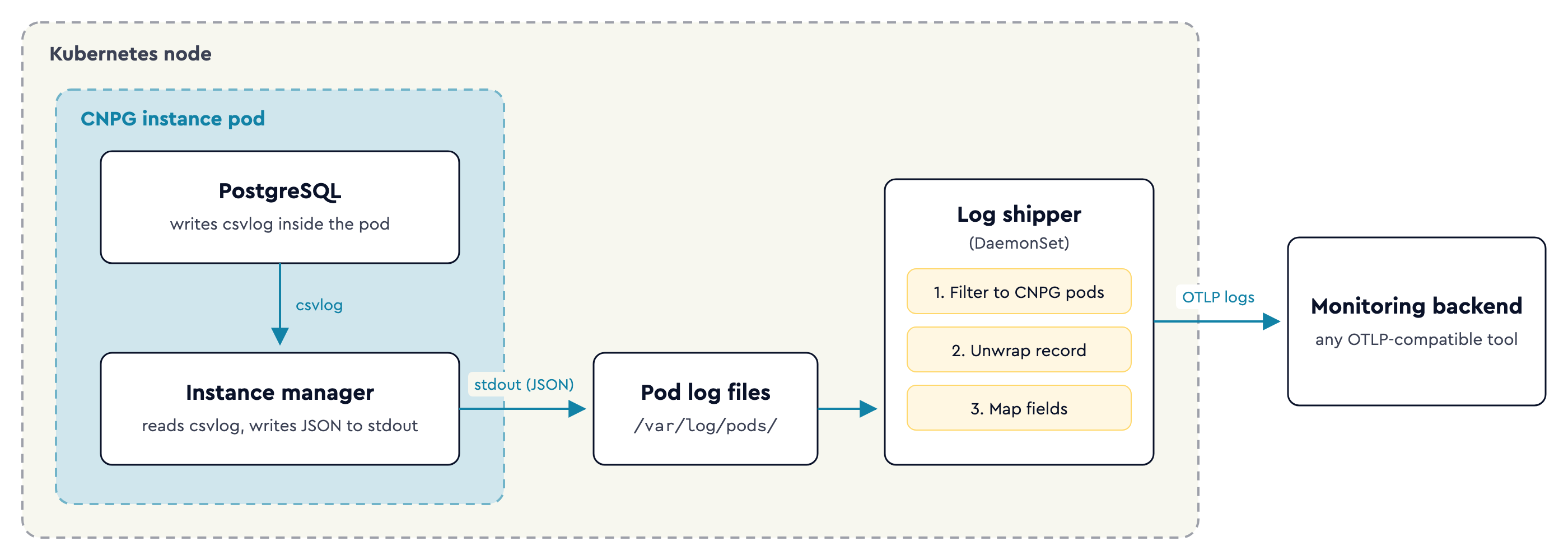
None of this is specific to one monitoring product. Any tool that analyzes CNPG logs has to do some version of the same thing: filter the pods, unwrap the envelope, map the fields, and forward the result.
What to check for other operators
To be honest, CNPG isn't unusual in this. Operators often take control of how their workloads handle configuration, storage, and I/O, because that control is part of what makes them reliable. If you are evaluating monitoring solutions for Postgres or another stateful service running under an operator, the first thing to check is whether the tool expects file or host access that the operator doesn't allow.
With CNPG, configuration and networking fit what most teams already know. Logging needs a different setup, and it's much easier to plan for that from the start than to find out after the cluster is in production.
KubeCon + CloudNativeCon is taking place in Salt Lake City, Utah from November 9 to 12. Register Now!
Author Bio:
Ryan optimizes database performance as a Solution Engineer at pganalyze, a Postgres monitoring and tuning tool for production workloads. Ryan has worked as a PostgreSQL advocate, developer, DBA and product manager for more than 25 years, with a prior focus on time-series data on PostgreSQL and the Microsoft Data Platform.