
Small Business Loan Calculator Comparison: Which Payment Estimator Saves You Money?

Image Source: depositphotos.com
Choosing a business loan is tricky. Lenders bundle costs into APRs, factor rates, and add-on fees that rarely line up cleanly.
Those figures can range from about 7 percent to 75 percent, and choosing the wrong offer may add roughly $10,000–$30,000 in extra payments over the loan’s life, according to a Finance Yahoo analysis of average rates (https://finance.yahoo.com/news/average-business-loan-interest-rates-163633794.html).
In the guide below, we’ll show you how to use online loan calculators to surface hidden costs and lock in the deal that keeps more cash in your company.
How we judge a loan calculator
Before we stack loan offers side by side, we first grade the calculators themselves. A sloppy widget can hide fees, gloss over payment timing, or mislabel rates, sending you down an expensive path.
We boiled the vetting process into five quick questions. The subsections below unpack each test and explain why it matters.
1. Supported loan types
Start with one question: does the tool handle the financing you need?
An SBA borrower faces a 25-year amortization and an upfront guarantee fee. A merchant cash-advance customer works with factor rates and daily withdrawals. If a calculator can’t model those quirks, its “monthly payment” is wishful thinking.
Look for menus or pages that list term loans, SBA 7(a), lines of credit, equipment financing, and short-term working-capital products. Lendio’s calculator hub is a solid benchmark; one click lets you swap among term, SBA, or LOC scenarios and still capture fees in each flow.
When a tool recognizes your loan type out of the box, every later comparison becomes a real apples-to-apples check rather than a math workaround.
Inputs and assumptions
A calculator only earns its keep when the numbers you enter match real life.
You want blank fields for every cost driver—loan amount, term, interest or factor rate, origination fee, and payment frequency. Anything the tool guesses can sandbag the results.
Ignore a three percent origination fee on a $250,000 term loan, and you hide an extra $7,500. Weekly payments on a short-term loan also pull interest forward. If the app assumes monthly billing, your cash-flow preview turns rosy until funds land in your account.
Rule of thumb: the more fields you fill, the better. Good calculators expose every variable up front, then explain each one so you enter data once and trust the math.
Transparency of calculations
Numbers alone aren’t enough; we need to see how the tool produces them.
The best calculators show total interest, total repayment, and an amortization table that spells out principal and interest for every period. Lendio’s calculator hub goes one better, presenting a scrollable schedule and real-time cost breakdown so the underlying loans are crystal-clear. When fees apply, a clear “real APR” line rolls them into one all-in annual rate so you can compare quotes fairly.
If the output is a single monthly figure with no breakdown, treat it like a black-box lender email. You would never sign a loan contract without line items, so don’t trust a calculator that withholds the same detail.
Quick gut check: can you export the schedule or at least scroll through every payment? If yes, the tool has nothing to hide. If not, move on before hidden costs hide from you.
Ability to compare multiple loans
Running numbers one quote at a time is like grocery shopping with blinders. You see price tags, but never the basket total.
A good calculator lets you plot two, sometimes four, offers on the same screen. Side-by-side columns instantly reveal which loan eats more cash, which one only looks cheaper, and how fees shuffle the leaderboard.
If a tool limits you to single scenarios, you fall back on spreadsheets, copy-pastes, and typos. Worse, you lose the emotional punch of a live comparison. When totals jump out in bold red, the pricier option stops looking “not bad” and starts looking painful.
Fast test: after you enter one loan, can you click “add another” without refreshing the page? If yes, you have a comparison engine. If no, pick a smarter tool.
User experience and clarity
A calculator earns zero points if it forces you to squint at tiny type, hunt for tooltips, or decode jargon.
Clean sliders, plain-English labels, and inline definitions keep the flow painless. When a field reads “factor rate,” the tool should explain in one sentence that a 1.3 factor means you repay 1.3 times what you borrow. No Googling required, no bad inputs.
Helpful microcopy protects you from self-inflicted wounds. A note beside the “term” box—“enter months, not years”—stops a 36-month loan from masquerading as three. Real-time error flags catch missing decimals before results appear.
If using the tool feels like filing taxes, back out. A polished interface shows the provider values transparency and, by extension, your bottom line.
Advanced features worth hunting for
Once the basics are covered, a few power options tilt the decision in your favor.
Look for an export button that sends the amortization table to Excel or Google Sheets. With a live spreadsheet, you can test early payoffs, layer in tax deductions, or blend two loans to model a refinance without retyping a cell.
If you live in dashboards, an open API is even better. Pipe real-time payment data directly into your cash-flow tool and spot trouble months before statements arrive.
Finally, guard your privacy. The smartest calculators show results instantly—no sign-up wall, no soft credit pull, no “book a call” ambush. If a site demands your email before revealing numbers, remember that data, not lending, may be its real business model.
Treat these conveniences as tie-breakers. When two tools rate equally on accuracy, choose the one that gives you superpowers while keeping your inbox clean.
Loan types and why calculators treat them differently
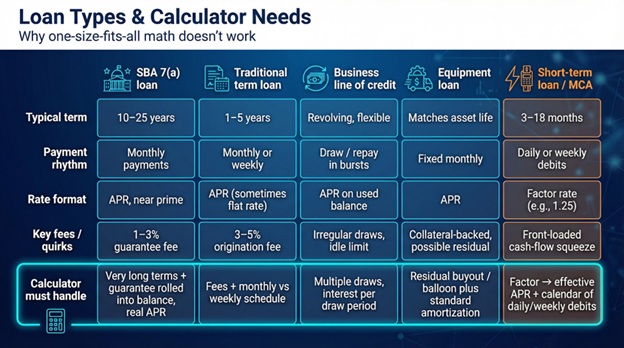
Every financing product follows its own playbook. Terms stretch or compress, payments jump from monthly to daily, and quotes switch between APRs and factor rates. One calculator rarely handles every twist, so match the tool to the loan instead of forcing one-size-fits-all math.
SBA loans: big savings hide in the fine print
Think of an SBA 7(a) loan as a long-haul flight with a checked-bag fee.
You enjoy roomy terms—10, sometimes 25 years—and interest only a few points above prime. On $500,000 that lower spread compounds into real cash you keep.
But the guarantee fee is the luggage charge most owners miss. Depending on loan size, it runs one to three percent and either comes out of pocket or rolls into the balance. If your calculator skips that line, the payment looks cheap while the true repayment quietly balloons.
A good SBA-specific tool fixes the gap in two steps: it accepts long terms measured in decades and surfaces a fee field that folds the guarantee into the loan amount, then shows an all-in APR so you can weigh it against quicker, pricier options.
Run the numbers right and an SBA loan often wins on total cost. Miss the fee and a bank term loan may edge ahead once everything is in the open.
Traditional term loans: the baseline every quote competes against
A term loan sounds simple: borrow a lump sum, repay it in equal installments over one to five years. That simplicity makes it the yardstick for judging faster or more exotic financing.
Yet even here calculators can mislead. Some banks advertise an APR that already includes fees, while many online lenders flash a low flat rate that ignores a three-to-five-percent origination bite. If your tool asks only for “rate,” you will understate cost and overrate the offer.
Payment timing matters too. Most bank loans bill monthly. Some fintech lenders draft weekly, pulling interest forward because the principal falls more slowly. The right calculator lets you flip a toggle from monthly to weekly so the cash-flow hit appears instantly.
Compare two term-loan quotes side by side and hidden differences pop. Equal rates? The loan with a fee loses on total dollars. Equal fees? The one with weekly debits loses on breathing room. When the math is transparent, you negotiate harder—or walk away—knowing exactly what “better” means.
Business lines of credit: flexibility that breaks simple math
A revolving line is your company’s safety net—you draw what you need, repay, then draw again. That freedom breaks the neat amortization every standard calculator assumes.
Most line-of-credit tools fudge reality by pretending you pull the entire limit on day one and amortize it like a term loan. Helpful for a ceiling-cost scenario, useless if you plan to tap the line in bursts.
For a clearer view, combine tools. First, plug each planned draw into a simple-interest calculator to see the cost for the exact period you expect the balance to sit. Then stack those micro-loans in a spreadsheet timeline. The picture is messier, but it mirrors cash flow—and cash flow is why you opened the line.
Equipment loans: straight-line schedules with a collateral twist
Financing a truck or CNC machine looks like any other term loan on the surface. Payments are fixed, terms match the asset life, and rates often dip because the gear itself backs the note.
For calculators, that collateral angle fades. The math mirrors a standard amortization. The key is entering the right rate: bank programs hover near the mid-single digits when collateral is strong, while alternative lenders climb into double digits for newer companies.
One caution: some vendors structure deals as leases with a residual buyout. Enter that residual in the final payment field if your calculator allows. Skip it and you will undercount both the payoff check and the interest that accrues while the balloon waits.
Otherwise, treat equipment financing as the easy win in your comparison sprint. Punch the data into any transparent term-loan tool and the answer you see is the answer you get.
Short-term loans and merchant cash advances: factor rates can hide high APRs
When speed beats price, many fintech lenders fund you in hours rather than weeks. The trade-off is a switch from percentage pricing to a multiplier. A 1.25 factor rate means you repay 25 percent more than you borrow, no matter how quickly you pay it back.
Standard loan calculators struggle with that input. Type “25” into an APR box and the math fails. To compare options fairly, use a tool that converts the factor to an effective APR for the chosen term. On a six-month schedule, the glossy 1.25 turns into roughly 60 percent APR, a number that often pushes owners back toward a slower, cheaper term loan.
Daily or weekly debits add another wrinkle. Because principal falls every business day, the balance—and interest—are front-loaded. A calculator that shows total cost without a payment calendar won’t warn you how hard those first few weeks will squeeze cash flow.
Bottom line: run the numbers through a dedicated MCA or factor-rate converter first, then drop the resulting APR into a transparent term-loan calculator. Only after both steps can you weigh a short-term offer against traditional financing and decide whether the premium is worth the time saved.
Feature matrix snapshot: where the calculators stack up
We audited a dozen tools and distilled the findings into a lean comparison grid. The view below highlights the leaders without drowning you in columns.
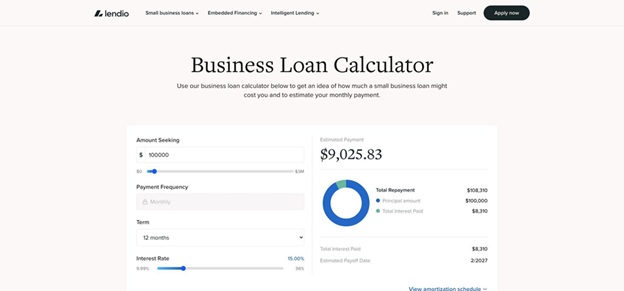
Lendio business loan calculators hub interface screenshot.
|
Tool |
Loan types covered |
Shows fees and real APR |
Side-by-side compare |
|
Lendio hub |
Term, SBA, LOC, equipment, short-term |
Yes |
No |
|
Calculator.net |
Generic term loans |
Yes |
No |
|
Fleximize converter |
Short-term, factor-rate focus |
Yes (factor → APR) |
One quote at a time |
|
Suncorp two-loan |
Term loans |
Partial |
Yes (two loans) |
A quick scan tells the story. Only two tools reveal both fees and effective APR. Just one lets you place two offers on the same screen. If you need factor-rate translation, the Fleximize widget is nearly the lone option.
Takeaway: you may need a toolbox rather than a single Swiss Army app. Pair a transparent calculator that handles fees with a comparator that handles multiples, and you cover 90 percent of real-world scenarios without spreadsheet gymnastics.
Real-world walkthroughs: from quote to answer in two minutes
Numbers come alive when we drop them into real stories. Let’s tackle two common borrowing puzzles and watch the calculators separate smart money from sunk cost.
Scenario 1: bank vs. online lender, speed premium exposed
You need $150,000 to fund a spring inventory push.
- Bank offer: 8 percent APR, five-year term, money lands in six weeks.
- Online lender: 11 percent APR, same term, funds within 24 hours.
We enter both quotes into a fee-aware term-loan calculator and click compare:
- Bank loan: $3,042 per month, total repay $182,520, interest $32,520
- Online loan: $3,262 per month, total repay $195,720, interest $45,720
That’s $220 extra each month and about $13,200 more interest for instant cash.
Decision frame: if waiting six weeks costs less than $13,200 in lost sales, choose the bank. If faster stock turns earn more than the premium, choose the fintech. The calculator shows the trade-off in hard dollars, no guesswork required.
Sprintzeal’s comparison guide echoes this point: side-by-side tools often flip the “cheapest” pick once fees and timing enter the spreadsheet.
Scenario 2: cash advance vs. three-year loan, cost versus cash-flow stress
A supplier wants $50,000 within days. Two offers arrive:
- Offer A: merchant cash advance, 1.3 factor, repaid over six months with daily ACH pulls
- Offer B: 36-month online term loan, 18 percent APR, monthly payments
Step 1: use a factor-to-APR converter. At 1.3 over 180 days, the effective rate tops 60 percent.
Step 2: feed both deals into a detailed calculator, noting daily debits for Offer A.
- Cash advance: about $460 drawn every business day, total repay $65,000, finance cost $15,000
- Term loan: $1,809 monthly, total repay $67,900, finance cost $17,900
Pure dollars favor the advance by roughly $2,900. Cash-flow view says otherwise. Six months of $460 debits feel like another payroll line, and one slow week could trigger an overdraft. The term loan costs a little more overall but keeps stress low.
With both perspectives, you choose whether speed and immediacy beat endurance and calm. The calculators do the math; you make the call.
Conclusion: Judgment calls calculators cannot make
Calculators nail the math; they stay silent on the human side of borrowing.
Funding speed. An SBA loan that saves $10,000 in interest is pointless if a lost contract costs $50,000. We weigh calendar days as carefully as percentage points.
Repayment rhythm. Daily or weekly debits match a café’s cash drawer but strain a firm that invoices monthly. Always align payment cadence with revenue cadence.
Collateral. Pledging a delivery van can shave two points off the rate yet ties a growth asset to a lender’s lien. Peace of mind can outweigh a discount.
Paperwork. Bank covenants, quarterly reports, and personal guarantees consume attention. If a lean fintech process frees you to chase sales, the premium may pay for itself.
Relationship equity. A modest bank loan today can unlock a seven-figure credit line tomorrow. That option value rarely appears on a spreadsheet but can dwarf a few thousand dollars in extra interest.
Treat these qualitative factors as the final filter once the calculators finish their job. Numbers frame the decision; strategy seals it.