
7 Best AI Search Tools Across Slack, Google Drive, and GitHub That Flag Stale Docs
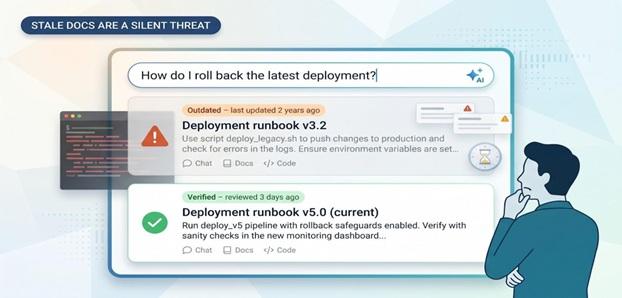
Why Stale Docs Are A Silent Threat
An authoritative-looking snippet can be poisonous if it’s two versions behind. A Gartner CX survey found that 56 percent of users complain about outdated documentation, and a 2026 Support Ops study attributes nearly 40 percent of tickets to articles that are stale or unclear.
If a deployment script changes yet the old README still ranks first in Slack, you can lose an afternoon chasing errors. Multiply that across every lapsed policy, pricing deck, or support macro, and productivity shrinks—along with audit scores and customer trust.
Legacy keyword search misses the rot. Modern AI search layers recency, consistency, and conflict, flagging suspect pages the way QA quarantines bad builds.
The payoff for fresh answers is immediate: faster onboarding, fewer escalations, and incident recoveries measured in minutes, not hours. In high-velocity teams, trustworthy knowledge isn’t a luxury—it’s table stakes.
What To Look For In An AI Search Tool
Use this five-point checklist before you start a trial:
- Integration depth. Can it connect to Slack, Google Drive, and GitHub out of the box? Gartner projects that through 2026, organizations will abandon 60 percent of AI projects that lack AI-ready data. This risk multiplies when a search tool needs custom middleware to reach all three sources.
- Search intelligence. You should expect natural-language queries, direct answers, and inline citations. Anything less is just old-style keyword search with a new label.
- Freshness signals. Real-time indexing, review reminders, and conflict alerts keep outdated instructions out of answers.
One vendor that already builds this in is Slite.
Its verification workflow lets page owners set review windows—say every 90 days—and the system auto-sends expiration reminders; any doc that lapses is demoted in AI answers until it’s re-verified.
That kind of guardrail turns the “freshness signals” pillar from theory into muscle memory for the whole team.
- Security and compliance. A current SOC 2 Type II report now appears in 100 percent of enterprise RFPs, according to a 2026 Certificate Analysis. Check that the tool maps permissions at the source level so private repos stay private.
- Time-to-value vs. cost. If you can spin up a pilot in hours rather than sprints, you will often offset a higher price by cutting repetitive questions sooner.
Score every contender against these five pillars, and the best options will stand out quickly.
1. Slite: Turns Scattered Docs Into Trusted Answers
Many teams outgrow Guru’s rigid card format as documentation expands.
The comparison guide from Slite shows how its Knowledge Management Panel suggests AI-driven bulk actions to keep docs fresh while costing about 20 percent less, making large-scale upkeep realistic.
Slite Knowledge Management Panel with Last Reviewed Badges
Slite pairs a self-maintaining wiki with an AI search layer, so every page you create can answer the next question in Slack, the browser extension, or the Slite app.
- Deep integrations. Slack, Google Drive, GitHub, Jira, Notion, and 20+ other sources connect natively; your team can start querying in minutes.
- Freshness by design. Each doc shows a last reviewed badge, and owners get reminders when review dates lapse. The same approach helped one customer cut repeat Slack questions by 90 percent.
- Permission-aware answers. Slite enforces source-level ACLs at query time and meets SOC 2 Type II, HIPAA, and GDPR requirements.
- Fast pilot, flexible growth. Most teams ship a proof of concept in an afternoon, then add collections, templates, and approval workflows as the corpus grows. Pricing starts with a free tier; usage-based AI credits keep costs predictable.
Best for: Teams that treat documentation as a product and want verified knowledge plus AI answers in one place.
2. Slack Enterprise Search: Answers Without Leaving Your Chat Window
Slack already has your team’s attention, so showing answers inside the search bar feels natural. Type a question and Slack AI returns a cited summary stitched from channel history plus connected tools such as Google Drive, GitHub, Salesforce, and Confluence.
Slack Enterprise Search AI Answer Inside the Slack UI
The workflow keeps everything in one window, with no extra tabs or log-ins, and results respect existing permissions so private repos stay private.
Limits to note:
- Freshness. Slack shows timestamps but does not flag outdated docs; you will need a governance add-on or manual reviews.
- Availability. Enterprise Search ships with the Enterprise Grid subscription and requires the Slack AI add-on, released in February 2024.
- Cost. Slack’s new pricing moves advanced AI features to an Enterprise+ tier; smaller teams may find the entry point steep.
If your company already runs on Slack and you want a zero-setup first step into unified search, this built-in option is the fastest way to experiment. Just budget for the upgrade.
3. Glean: Google-Grade Search For Your Internal Stack
Glean’s founders once shaped Google’s ranking signals and now focus that expertise on enterprise data. When you start typing, auto-complete predicts your intent, and pressing Enter returns results ranked by who you work with, what you are working on, and which docs teammates actually read.
Glean Unified Enterprise Search Results Across Work Apps
Integration depth. More than 100 connectors — including Slack, Google Drive, GitHub, Confluence, Jira, and Salesforce — feed a single index with permission enforcement through its Slack connector. Ask “Where’s the SAML troubleshooting playbook?” and Glean can surface the exact paragraph inside a two-year-old runbook.
Contextual ranking. Org charts, project memberships, calendar signals, and message history tailor results to each person, cutting noise and helping adoption.
Freshness model. Glean leans on usage signals and source timestamps. Neglected docs slide down the rankings, but they are not explicitly flagged, so pair it with a governance workflow if you need hard expiration dates.
Security and scale. SOC 2 Type II and tenant isolation are standard. According to Glean’s blog, the platform proved itself at Fortune 500 size after a $100 million Series C at a $1 billion valuation in 2022.
Pricing. Quote-based and aimed at mid-size to large enterprises; most teams run a proof of concept before full rollout.
Best for companies that want Google-quality relevance across a wide app stack and have a budget to match.
4. Dashworks: Slack-First Assistant That Delivers Real Answers
Dashworks feels like a knowledgeable teammate who jumps into your Slack threads with the answer, complete with citations.
- In-Slack auto responses. According to Dashworks, its Slackbot can save team members about an hour per day by answering repetitive questions automatically. Responses include quick-action buttons such as Show doc or Ask follow-up.
- Continuous indexing. Google Drive, GitHub, Notion, Jira, and dozens more sources sync every few minutes, so a freshly merged PR appears in answers almost instantly.
- Freshness safety net. Answers below a confidence threshold land in an admin queue, helping content owners catch outdated or weak sources before they mislead the team.
- Security and compliance. Dashworks enforces source-level permissions and provides SOC 2 Type II reports on request, and it also offers optional EU data residency for larger plans.
- Pricing. Usage-based with a free starter tier; paid tiers unlock analytics and custom retention.
Best for fast-growing startups that live in Slack and want to deflect repeat questions without creating a separate knowledge base.
5. Dropbox Dash: Lightning-Fast File Finder With A Dash Of AI
Dropbox Dash feels like Spotlight for your cloud. Launch the search bar, type a few words, and you will see results from Dropbox, Google Drive, Gmail, Slack, and open browser tabs almost instantly.
Speed first. Dash indexes continuously and performs many queries locally, so simple filename searches return in milliseconds, which helps when you need Q3 roadmap.xlsx without digging through folders.
AI assist. Dash offers smart suggestions and snippet previews instead of full chat answers. Ask “reset 2FA in HubSpot,” and Dash highlights the likely doc so you can click through and keep moving.
Integration scope. Core connectors include Google Workspace, Outlook, Slack, and Notion. GitHub search still relies on a browser plug-in, so dev teams may keep a dedicated code tool until native support arrives.
Freshness trade-off. Dash does not flag stale docs, but its recall speed often brings forgotten files back into view, which you can treat as a monthly clean-up prompt.
Security and pricing. Dash inherits Dropbox’s SOC 2 Type II controls and comes bundled with most Dropbox Business plans, making it effectively free for existing customers.
Ideal for design, legal, or operations teams that store thousands of files and prize raw search speed over conversational answers.
6. Guru: Knowledge That Comes With A “Freshness Label”
Guru stores answers as bite-sized Cards and gives each one a traffic-light badge: green = verified, yellow = review soon, red = outdated. When a review date lapses, Guru pings the subject-matter expert in Slack and automatically demotes the Card in search and AI answers with no guesswork required.
Guru Cards with Traffic-Light Freshness Verification Badges
That workflow pays off. According to a HireVue case study on Guru’s website, the company cut support-agent onboarding time by 60 percent after adopting Guru’s verification system.
Slack-native productivity. You can slash-search the knowledge base, drop a Card into a thread, or let Guru auto-suggest answers as you type. Because updates apply at the Card level, the next person who asks gets the corrected answer instantly, with no crawler lag.
Scope trade-off. Guru does not crawl your entire Drive or GitHub repo; you decide what becomes a Card. Many teams appreciate that discipline, while others pair Guru with a broad enterprise search tool for long-tail file digging.
Security and pricing. Guru offers SOC 2 Type II compliance and optional EU data residency. Pricing starts with a free tier; paid plans run on a per-user model.
Best for teams that consider trust non-negotiable and want a visible freshness label on every answer.
7. Swirl (open source): Full-Stack Control For Security-Obsessed Teams
Swirl is a self-hosted federated search layer that runs on your own infrastructure. Point it at Slack, Google Drive, GitHub, Confluence, Salesforce, and more than 100 connectors out of the box, and it returns ranked snippets or a generative answer from whichever LLM you configure.
Swirl Open Source Federated AI Search Dashboard
Because Swirl lives behind your firewall, no document leaves your network, a clear win with legal and security teams. You can isolate workloads by department, set custom retention rules, and swap models (OpenAI, Anthropic, open weights) whenever policy shifts.
Deployment. Run docker compose up, add API keys, and Swirl starts crawling sources to build a vector index. Expose a web UI, embed the widget in Slack, or hit the REST endpoint from your own chatbot.
Freshness. Re-indexing schedules are configurable, but flagging stale or conflicting docs is DIY. Many teams add a simple freshness score based on metadata and surface warnings in the UI.
Cost and license. The code is Apache-2.0 on GitHub (about 3,000 stars). You pay only for the computer and any external LLM calls. Enterprise add-ons provide SSO and role-based access.
If you want enterprise search without vendor lock-in and have the engineering muscle to maintain it, Swirl offers maximum privacy and flexibility in one open-source stack.
Compare The Contenders At A Glance
|
Product |
Slack / Drive / GitHub |
AI answer style |
Freshness guardrails |
Security and privacy |
Pricing |
Best for |
|
Slite |
✓ / ✓ / Beta |
Conversational answers in Slack, with citations |
“Last reviewed” badge and automatic owner reminders |
SOC 2 Type II, EU data residency |
Free tier, then per user |
Teams that centralize docs and keep them fresh |
|
Slack Enterprise Search |
✓ / ✓ / ✓ |
In-bar AI summary with citations |
Timestamp only |
Inherits Enterprise Grid RBAC, data stays in Slack |
Add-on to Enterprise Grid (AI bundle) |
Orgs that want zero extra tools |
|
Glean |
✓ / ✓ / ✓ |
Google-style ranking and chat UI |
Usage signals demote stale docs |
SOC 2 Type II, tenant isolation |
Quote-based |
Large companies seeking fast, relevant answers |
|
Dashworks |
✓ / ✓ / ✓ |
Slackbot answers with inline citations |
Low-confidence queue for admins |
SOC 2 Type II, US or EU hosting |
Usage-based; free starter |
Start-ups deflecting repeat questions |
|
Dropbox Dash |
✕ / ✓ / ✕ |
Instant file previews, smart suggestions |
None |
Inherits Dropbox SOC 2 stack |
Included in most Business plans |
File-heavy teams that prize raw speed |
|
Guru |
✓ / ✕ / ✕ |
Card suggestions with visible verification badge |
Built-in verification workflow (green / yellow / red) |
SOC 2 Type II, auto-archive |
Per user tiers; free for small teams |
Support or compliance teams needing trusted answers |
|
Swirl (OSS) |
✓ / ✓ / ✓ |
Pluggable LLM, RAG snippets |
User-defined scripts |
Self-host (Apache-2.0), data never leaves infra |
Free code, infra cost only |
Security-sensitive orgs with dev resources |
Scan the row that matches your biggest need—governance, speed, or privacy—then choose that tool for your first trial.
Conclusion
Stale documentation silently erodes productivity and trust, but today’s AI-powered search tools can surface the freshest, most reliable answers right where teams work. Evaluate each option against integration depth, freshness signals, security, and time to value, then pilot the tool that best matches your priorities.