
Bot Traffic: Why Your Analytics and Your Server Log Show Two Different Websites

Image Source: depositphotos.com
Your analytics says 412 visitors last month. Your hosting panel says 38,000 requests.
Neither number is broken, and most of the gap between them has a name.
Here’s what’s going on, and how to measure it on your own site in fifteen minutes.
The two numbers that never match
Open your analytics and write down last month’s visitors.
Now open your hosting panel, find the raw access logs, and count the lines.
The second number will be bigger. Not ten percent bigger. Often ten times bigger.
Most owners see that gap once, decide something is misconfigured, and go hunting for the bug. There isn’t one.
Your server log records every request that reaches the machine. Every page, image, stylesheet and script, whoever asked for it.
Your analytics records something much narrower: page views where a real browser loaded a real page and ran a small piece of JavaScript.
Those are two different sets of things, and the gap between them is where bot traffic lives.
Those figures are an example. Yours will differ. The shape won’t.

What is bot traffic, and how much of internet traffic is bots?
Bot traffic is any request to your site that wasn’t made by a person at a screen.
- Search engines indexing your pages.
- Uptime monitors checking you’re alive.
- AI companies collecting text for training.
- Scripts hunting for an unpatched plugin.
Three large measurements, all recent, all apparently disagreeing:
- Thales, in its 2026 Bad Bot Report covering 2025, found 53% of all web traffic was automated, up from 51% the year before.
- Cloudflare wrote in July 2026 that “more than 50% of traffic on the Internet is now non-human.”
- Fastly, measuring 2025 traffic through its own security products, put it at 37% automated.
They look like they contradict each other. They don’t.
Thales counts every request including API calls, across customers who bought bot protection. Which is to say, sites bots already target.
Cloudflare counts HTML page requests, and Fastly counts what passes through its firewall.
Different denominators, not different facts.
The honest summary: on most of the web, roughly half of what hits your server isn’t a person.
Good bots vs bad bots, and the ones in between
The usual split is good bots and bad bots. It’s a useful start, and it breaks down fast.
- Bots you want. Googlebot, Bingbot, Applebot, uptime monitors. In Cloudflare’s 2025 review, search crawlers made up 40% of verified bot traffic, and Googlebot alone was over 28%.
- AI crawlers. GPTBot, ClaudeBot, PerplexityBot, Meta-ExternalAgent and a dozen more. Roughly 20% of verified bot traffic, and 4.2% of all HTML requests on Cloudflare’s network in 2025.
- Bots nobody wants. Credential stuffing, vulnerability scanners, price scrapers, spam. Thales puts this group at 40% of all web traffic.
Here’s the part that trips people up. Good and bad isn’t a property of the bot at all. It’s a property of the deal you have with it.
Cloudflare reported in July 2026 that over a third of crawler activity comes from bots with mixed purposes.
The same request might feed a search index, answer somebody’s question, or train a model.
You can’t tell which from your log, and nobody is obliged to tell you either.
Stop reconciling the numbers. Give each one a job
You won’t ever reconcile those two numbers, so stop trying and give each one a job instead.
Your server log is where you ask about load: bandwidth, error storms, which URL is getting hammered and by whom.
It records every request, so that’s where the answers are.
Your analytics is where you ask about people: which pages they read, where they arrived from, what they clicked.
It only records sessions where a real browser rendered a real page.
The counter isn’t broken when it shows you the smaller number. That smaller number is simply the answer to a different question.
Which suggests a fairer way to judge an analytics tool.
Not by how big its numbers look, but by whether you can explain every figure on the screen without opening a manual.
Tools like this one are built around that idea: web analytics that’s easy to read, on one screen and in plain wording. That makes the comparison with your log much easier, because you always know what each figure counts.
Whatever you run, keep the test: if a number on your dashboard can’t be explained in one sentence, it won’t survive the first time it disagrees with your server.
Most crawlers never run your JavaScript
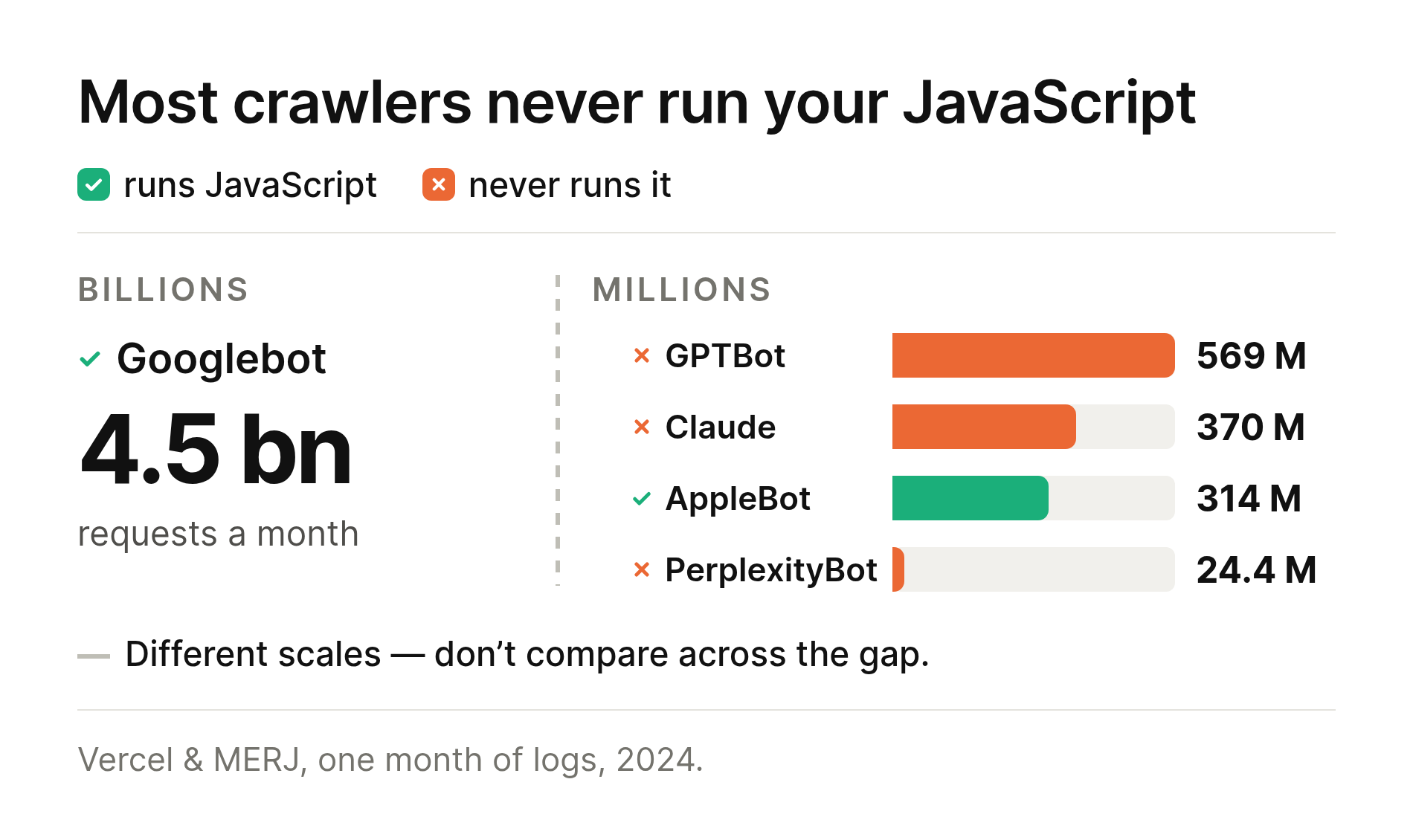
Here’s the mechanism behind the gap. Your analytics script is JavaScript, and it only reports a visit if a browser actually executes it.
In December 2024, Vercel and MERJ published a month of real server logs covering billions of crawler requests.
Their finding, word for word: “none of the major AI crawlers currently render JavaScript.”
That covers the bots run by OpenAI, Anthropic, Meta, ByteDance and Perplexity, plus Common Crawl.
Googlebot does render it, and so does AppleBot.
Those crawlers do download your JavaScript files.
ChatGPT’s crawler spent 11.5% of its requests on them, and Claude’s spent 23.84%.
They never run the code. They read it as text.
So every one of those visits is invisible to your dashboard and obvious in your log.
The same dataset holds a second number worth your time.
34.8% of ChatGPT’s requests and 34.2% of Claude’s landed on 404 pages, against 8.2% for Googlebot.
That’s a third of those two crawlers’ budget spent guessing at addresses. You would never know from your analytics, because a 404 doesn’t run your tracking script either.
GPTBot and the other AI crawlers, by name
They don’t all want the same thing, and they don’t all behave the same way.
|
Bot |
Run by |
Why it’s here |
Runs JS |
Obeys robots.txt |
|---|---|---|---|---|
|
GPTBot |
OpenAI |
Training data |
No |
Yes |
|
OAI-SearchBot |
OpenAI |
Search inside ChatGPT |
No |
Yes |
|
ChatGPT-User |
OpenAI |
Somebody asked a question |
No |
“May not apply” |
|
ClaudeBot |
Anthropic |
Training data |
No |
Yes |
|
PerplexityBot |
Perplexity |
Indexing for answers |
No |
Yes |
|
Perplexity-User |
Perplexity |
Somebody asked a question |
No |
“Generally ignores” |
|
Meta-ExternalAgent |
Meta |
Training and indexing |
No |
Yes |
|
Googlebot |
|
Search, and AI too |
Yes |
Yes |
Both quoted phrases come from the companies’ own documentation. When a human triggers the fetch, the rules loosen by design.
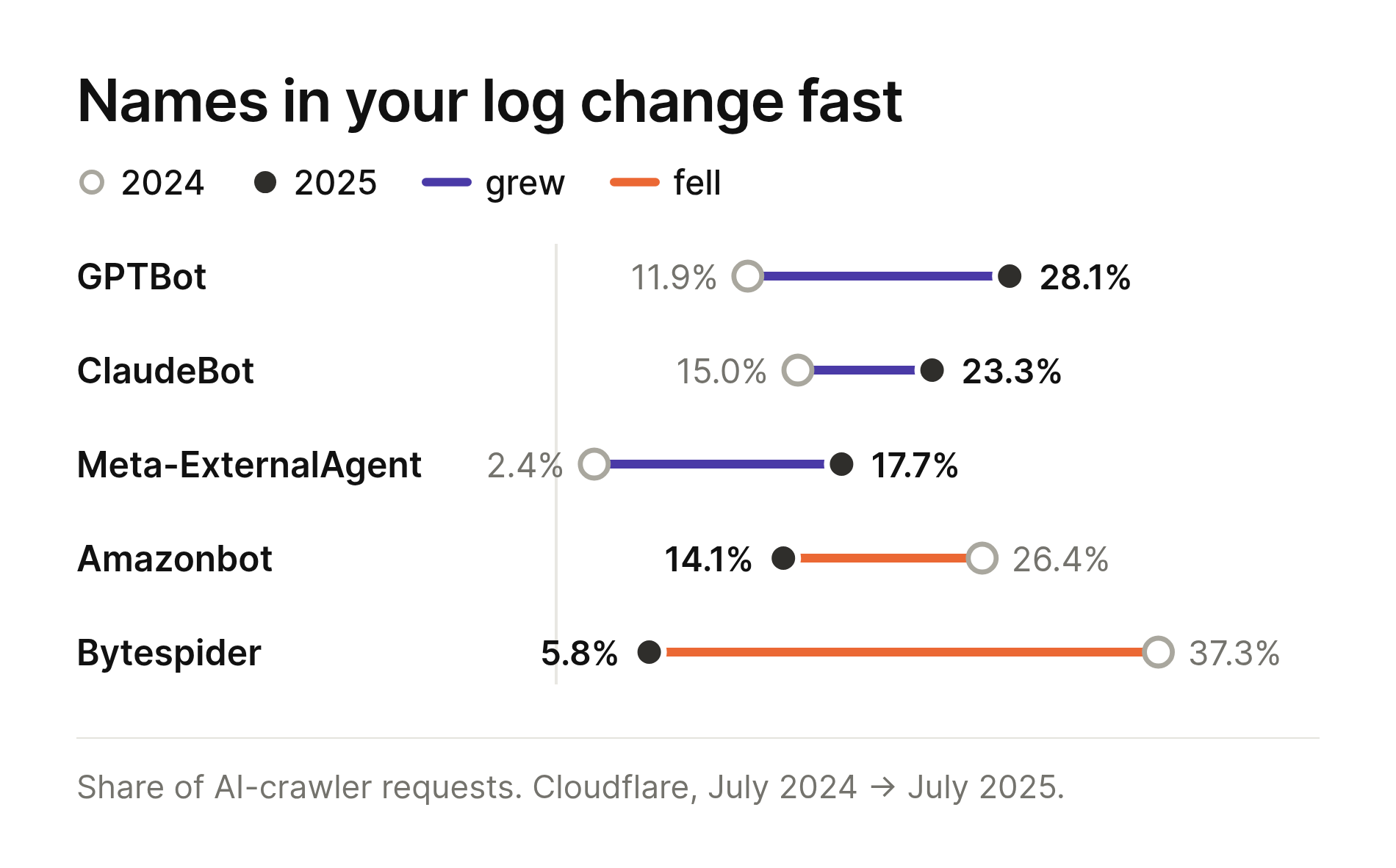
Among the AI crawlers, GPTBot is the one you’ll see most.
By July 2025 it accounted for 28.1% of AI crawler traffic on Cloudflare’s network, up from 11.9% a year earlier.
ClaudeBot was 23.3%, and Meta’s agent climbed from 2.4% to 17.7%. ByteDance’s Bytespider went the other way, collapsing from 37.3% to 5.8%.
Then there’s the new category the table above doesn’t cover.
Agentic browsers like ChatGPT Atlas and Perplexity Comet are real Chromium browsers driven by a model.
They run your JavaScript, they land in your analytics, and they look exactly like a person.
Two more reasons your website bot traffic stays hidden
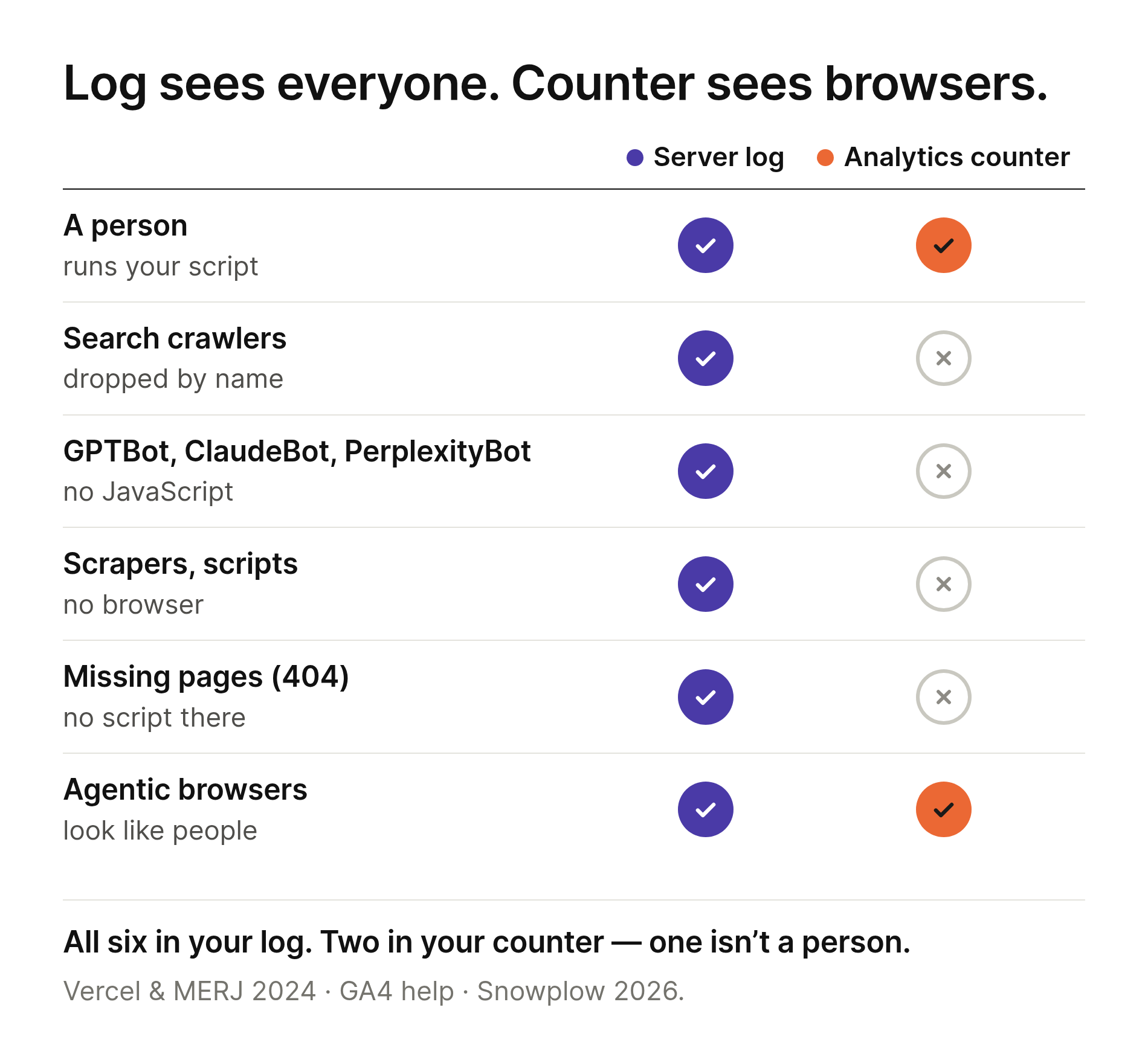
JavaScript isn’t the only thing trimming your dashboard down.
Plenty of requests never reach a rendered page at all.
- Somebody probing /wp-login.php.
- A feed reader pulling your RSS.
- An uptime monitor.
- A scanner walking a list of file names that don’t exist on your site.
Every one of those is a line in your log, and none of them opened a page carrying your tracking script.
And your analytics quietly removes some of what’s left.
Most tools filter known bots out before you see the data, which is the right default.
It also means the number on your screen has already been edited, and nobody tells you by how much.
Which brings us to the sharpest version of that problem.
Google Analytics bot filtering: what it removes and what it hides
Google Analytics 4 filters known bots automatically, and the policy sits in Google’s own help center.
“In Google Analytics properties, traffic from known bots and spiders is automatically excluded.”
Good so far, and then this:
“At this time, you cannot disable known bot traffic exclusion or see how much known bot traffic was excluded.”
Read that one twice. The filter is always on, you can’t switch it off, and you can’t see what it took.
The list it works from is Google’s own research plus the International Spiders and Bots List maintained by the Interactive Advertising Bureau.
A published list of known names.
Which tells you exactly what it can’t catch: anything off the list, anything that doesn’t announce itself, anything driving a real browser.
The wording on that page is careful. Your data excludes known bots “to the extent possible.”
The three data filters GA4 actually gives you
You do get filters. Exactly three:
- Developer traffic excludes activity coming from debug mode.
- Internal traffic excludes an IP address or a range of them. This is the one people mean when they search for “GA4 exclude internal traffic”.
- Web hostname traffic excludes event data arriving from domains that aren’t yours.
There’s no bots filter and no spam filter. Those three are the whole toolbox.
Two properties catch people out, both of them in Google’s documentation.
Filters only ever work forward: “data filters do not affect historical data.” Last month stays exactly as dirty as it already was.
They’re also permanent, because excluded data “is never processed and will never be available in Google Analytics or BigQuery.” Not hidden. Gone.
Set an exclude filter too wide and that data is gone for good.
Referrer spam: where fake traffic to websites comes from
Sooner or later a domain you’ve never heard of turns up in your traffic sources.
You didn’t get a link from them. You got referrer spam.
It arrives two ways, and the difference decides where you can see it.
The first kind actually visits your site.
A bot requests your page and forges the referrer header, hoping you’ll spot the name and go look.
That one is an ordinary line in your log, with a real address and a real user agent.
The second kind never touches your site at all.
The data goes straight to the analytics collector, and no page was ever opened.
Your log has no record of the visit. Your dashboard shows one.
In GA4 that route needs a key: the measurement protocol requires an api_secret you create yourself in the admin panel.
Google’s warning about that key is blunt. Exposing it “allows unauthorized parties to send arbitrary or spam data to your Google Analytics property, which can corrupt your reporting.”
If you get hit, the web hostname filter is your tool: fake hits usually carry a hostname that isn’t yours.
One thing not to confuse it with: the unwanted referrals setting is for your own payment processor or email domain, not for spam.
What the ad industry calls invalid traffic
Advertisers have had a written standard since 2015. Site owners never got one.
The Media Rating Council defines invalid traffic, or IVT, as traffic that “does not meet certain quality or completeness criteria, or otherwise does not represent legitimate traffic that should be included in measurement counts.”
It splits in two:
- GIVT, general invalid traffic, is caught by routine filtering against lists: data center traffic, “bots and spiders or other crawlers,” non-browser user agents, prefetched pages.
- SIVT, sophisticated invalid traffic, needs real analysis to spot: hijacked devices, automation tools, incentivized clicking, cookie stuffing.
Look at that first bucket: crawlers and non-browser user agents. The exact thing this article is about.
Now compare what each side gets to see.
A Google Ads advertiser can add an Invalid clicks column and watch it move.
Invalid activity is removed before billing, so they don’t pay for it, and anything caught later returns as a credit.
You, running the same website, cannot see how many bots were removed from your analytics.
Same company, two dashboards, and only one of them shows you the number.

The smaller the site, the larger the automated share
Most bot statistics come from companies selling bot protection. Here’s one you can check yourself, free.
Wikimedia publishes its pageview data split by client type, with no key and no sign-up:
- user for the ones Wikimedia believes are people.
- spider for bots that name themselves in the user agent.
- automated for clients that look like browsers but behave like machines.
Share of pageviews that weren’t people, August 2026:
- English Wikipedia 32.6%
- German 31.0%, Polish 33.6%, French 35.0%, Russian 36.6%
- Ukrainian 59.7%
- Danish 67.2%, Lithuanian 68.8%, Estonian 70.5%
- Icelandic 80.9%
- Welsh 90.3%
- Maltese 92.8%
English Wikipedia gets nearly ten billion views a month, and a third aren’t people.
Maltese Wikipedia gets two million, and more than nine in every ten requests aren’t people.
The pattern is the point. Crawlers walk a site’s address list whether or not anybody reads it, so their load barely scales with popularity.
Human traffic scales with popularity completely.
The smaller your audience, the larger the automated share of your log.
Your small business site sits closer to the Maltese end than the English one.
August wasn’t a fluke: across all Wikimedia projects the non-human share stayed between 39.7% and 49.0% every month for a year.
Swap the project name and client type to check any row yourself:
https://wikimedia.org/api/rest_v1/metrics/pageviews/aggregate/is.wikipedia/all-access/spider/monthly/2026080100/2026083100
How to identify bot traffic on your own site
Fifteen minutes, no paid tools, six steps.
- Find your raw log. In cPanel it lives under Metrics, then Raw Access, where you can download the current log and the archived ones. On your own server it’s usually access.log.
- Count who is visiting. GoAccess is free and builds a report you can open in a browser, from one command:
goaccess access.log -o report.html --log-format=COMBINED. Then read the top user agents. - Separate the ones that named themselves. Googlebot, GPTBot, ClaudeBot, Bingbot and the rest all put their name in the user agent, so add up their requests.
- Check they are who they say they are. A user agent is one line of text and anyone can type it. OpenAI, Anthropic and Perplexity publish the addresses their bots use as JSON files, openai.com/gptbot.json among them. Take an address from your log and check it against the list.
- Compare with your analytics for the same dates. Now you have two numbers and you know what each counts, so write both down.
- Repeat next month. One measurement tells you little. The trend tells you everything.
Your log always holds far more lines than your dashboard holds visits, and crawlers and monitors are welcome residents.
What should make you look harder:
- One user agent making thousands of requests an hour.
- A burst of hits to /wp-login.php, /xmlrpc.php or /.env.
- Heavy crawling of sections you don’t even promote.
- A wave of direct visits with zero time on page, all from one country.
- A name from your log whose address isn’t on the published list.
How to stop bot traffic: what works and what doesn’t
robots.txt is a request, not a lock.
Cloudflare’s documentation says it plainly: “robots.txt compliance is voluntary.”
Your server still hands the page to anybody who asks for it.
Some bots tell you in advance they won’t follow it, as the crawler table above shows.
Rate limiting works, but only selectively.
Anthropic supports Crawl-delay, while Google doesn’t and says so: “other fields such as crawl-delay aren’t supported.”
Blocking at the network edge is the only thing that stops a request.
A firewall or CDN rule refuses the connection before your server does any work. Without one, an .htaccess rule matching the user agent is the nearest thing: the request still reaches your server, but no page gets built.
On Cloudflare that rule is available on every plan, the free one included.
Think hard before you block everything.
The same crawler often serves both training and live answers, so shutting the door can quietly remove you from AI results as well.
And llms.txt isn’t worth your afternoon.
Ahrefs looked at 137,210 domains in 2026 and found 97% of published llms.txt files had never been fetched.
Of the fetches that did happen, 77% came from SEO crawlers, not AI tools.
Where this method is weak
Three honest limits.
The Wikimedia split is a heuristic of their own, not an industry standard, and they say themselves they aren’t trying to catch every bot.
Wikipedia is a far more attractive target than your site, so borrow the direction of that pattern, not the level.
Your log has blind spots too: a request served by a CDN or page cache may never reach your server.
And a user agent is still just text, so without step four, anything you conclude from a name is a guess.
Frequently asked questions
Does Googlebot show up in my analytics? No. It does run JavaScript, but analytics tools filter it out by name and address before it reaches your reports.
My traffic dropped when I switched analytics tools. Did I lose visitors? Probably not. Two tools define a visit differently and filter different things, so compare the same month in both.
Should I block AI crawlers? It depends what you sell. If your traffic comes from people finding your pages, blocking the crawler that feeds AI answers removes you from those answers too.
Is a bot a visitor? Not in your analytics, and that’s the right call. In your log it’s a request like any other, costing you the same bandwidth.
Final Thoughts
- Your server log records every request. Your analytics records page views where a browser ran a script.
- Most AI crawlers don’t run that script, so they stay invisible in your dashboard and obvious in your log.
- Google Analytics removes known bots automatically and won’t tell you how many.
- You can measure the gap yourself in fifteen minutes with your raw log and one free tool.
- robots.txt is a polite request, and only a rule at the network edge actually blocks anything.