
How Automating Incident Management Can Improve ITSM Workflows

Incident Management is a core use case for many ITSM platforms, but in most cases, there are ways to improve its implementation. One of those is through automation, and that’s particularly true if multiple platforms are involved.
In this article, you’ll learn how automating incident management can speed up your workflows and deliver better service results for you and your clients.
What is ITSM?
Information Technology Service Management, or ITSM, means managing the various services that you provide to your customers using ITSM software and practices. Its core components include your service desk, project planning, change management, and anything else you do to create and implement services.
What is incident management in ITSM?
Many ITSM systems are used for incident management, which involves tracking an incident from start to finish. An incident’s life cycle begins with detection and logging. Then it needs to be categorized, prioritized, assigned to someone, and then finally resolved. When finished, you can archive it for future reference. Tracking related metrics, such as resolution time, helps you improve performance.
Dedicated ITSM tools, such as ServiceNow and Jira Service Management, can help automate all of the above. However, these tools aren’t optimal for remote-first or globally dispersed teams. Such teams need to interact with others, like their service providers or external partners, who might be using completely different systems.
Why automated incident management can benefit ITSM integration?
Those separate teams need a way to interact with each other, and an automated system needs to be able to handle this. The integration system needs to manage data used across multiple external systems and consolidate it so it can be used in shared workflows.
One common scenario here is with managed service providers (MSPs). These providers' entire business is built around customers with their own ITSM systems. So, enabling data flow and streamlining workflows between these systems can provide huge benefits to the providers and their clients, greatly increasing the utility of their services.
The goal is that teams can raise tickets on one system, and the system will automatically raise equivalent tickets on the central system. They can then be analyzed, prioritized, or shared with teams that use the data in different contexts.
How can ITSM integration help automate incident management?
There are many ways an ITSM integration can help you automate incident management. Consider the following example with respect to an incident lifecycle.
Automated Incident Detection
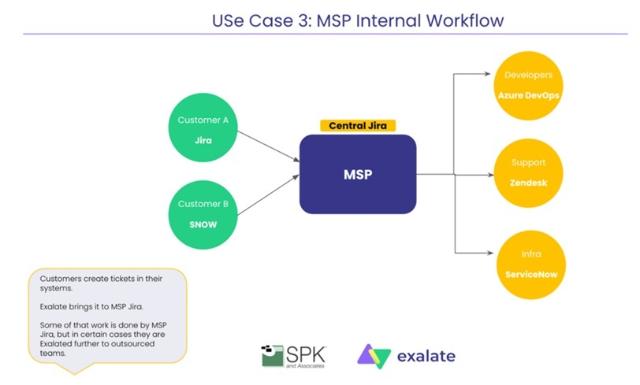
A managed service provider uses Jira to triage and prioritize tickets. Customer A and Customer B raise and detect an incident in their Jira and ServiceNow instances. These incidents are then automatically logged in the MSP's central Jira system, where they are categorized based on data within the ticket, such as labels and custom fields.
Incident Logging, Categorization & Routing Across Multiple ITSM Tools
Once an incident is logged in the central Jira system of the MSP, it is analyzed, categorized, and routed automatically. For instance, if the incident relates to development, it will be sent directly to the developers in Azure DevOps. If it concerns customer support, the incident will be forwarded to Zendesk for the support team. Infra-related issues will be routed to the infra team’s ServiceNow system. The categorization and routing are automated, based on the data in the ticket, ensuring it reaches the appropriate team with minimal manual intervention.
This streamlined routing ensures that the MSP’s internal systems efficiently manage and direct incidents to the right people, reducing incident resolution time and improving overall workflow efficiency.
Automated Communication and Status Notifications
The communication between teams is fully automated, ensuring that status updates and notifications flow automatically and in real-time. This ensures that the relevant people are notified of any incidents, whether they are dealing with it in Jira, ServiceNow, Azure DevOps, or Zendesk. Alerts and notifications are automatically sent to the correct stakeholders on whichever platform they are using, reducing the need for manual emails and ensuring that the team members are always in the loop.
Incident Resolution & Closure
When the incident is resolved in the internal MSP systems, all relevant data, such as status, comments, context, and resolution notes, are automatically shared back to the respective customer instances. Whether it's a Jira or ServiceNow instance, all pertinent information flows back to the customers, ensuring they have up-to-date status and resolution details.
This system creates a seamless, automated three-way incident management workflow.
For some MSPs, this setup has reduced incident resolution time by 25-40% and sped up the onboarding process, all while boosting SLA compliance. This reduction in manual communication, such as emails, and the ready availability of necessary information has led to a more efficient and effective incident management process.
In another example scenario, a Managed Service Security Provider (MSSP) can use automated incident management to deliver notifications through a client's own ITSM software. The automated system can copy all critical information from the central system and translate it to the form the client software uses, letting them know about detected vulnerabilities along with associated information like timestamps, the status of the system under attack, and what to do in response.
Which tools to use to automate incident management with ITSM integration?
Some ITSM platforms have their own integration methods, but they have limitations. They are often inflexible and are not ideal for automating end-to-end incident management workflows.
If you want to go deeper with an integration, a tool like Exalate can help. It is designed to deliver powerful integrations across different ITSM platforms. Its AI-assisted Script mode enables a wide variety of use cases.
With Exalate, you can map items to each system directly, choosing what data is synced, and selecting the conditions that trigger synchronization. You can map an incident from one system to another, either to equivalent or custom fields, and have those details handled through AI or use sensible defaults. person.
For example, you might want to replicate urgent incidents in ServiceNow belonging to a particular assignment group for the devs working in Jira. Or you might want to orchestrate the support workflow by automatically passing incidents between multiple ITSM tools.
MSPs use Exalate to handle incident management workflows in their own ITSM ecosystems, delivering reliable, secure connections without compromising the autonomy of any party. They even include it as a line item and provide it as a part of their service offering.
Conclusion
ITSM Incident management is complex, and anything you can do to improve related workflows can speed up responses and benefit everyone involved. That’s especially true when trying to build workflows across multiple platforms.
Tools like Exalate let you integrate these platforms securely and reliably while providing the flexibility to implement even the trickiest use cases.