
Nano Banana Pro in HitPaw FotorPea: Smarter Image Creation

AI images have come a long way from simple filters, and now creators want tools that can manage details such as a visual’s style, emotion, and fine attributes. This is where the new Nano Banana Pro model in HitPaw FotorPea shines. Used in both image-to-image and text-to-image creation, it is a seamless feature that visualizes ideas in a matter of seconds.
Unlike older tools that produced unsatisfactory results and struggled with prompt understanding, Nano Banana Pro allows for cleaner, sharper, and more reliable results. Users of the older nano banana model can now expect more elaborate control, detail, and speed when it comes to the execution of creative tasks in a near effortless way, be it improving a portrait, product image editing, or creating a whole new scene.
A New Level of Smart Image Understanding
When you start using the Nano Banana Pro, it becomes obvious that the model has a greater understanding of your images and prompts. It grasps details much better, understands styles on a deeper level, and produces results that feel much more personalized.
Why the Pro Version Feels More Accurate
The Nano Banana Pro has been trained to capture and understand instructions at a deeper level. When the user explains a mood, style, lighting, or situation, the model comprehends and executes it more accurately, yielding better results and requiring less effort and fewer retries.
Cleaner Edges and More Realistic Textures
One of the major problems of most AI tools is that their graphics have a tendency to have messy edges, such as hair that looks straggly, backgrounds that merge together inappropriately, or other missing elements. The Pro model resolves all such issues. Faces stay consistently accurate, clothing looks appropriate, and transitions in the background become seamless.
Better Control Over the Final Look
Nano Banana Pro can adapt to changes in:
- Softer light
- Darker shadows
- More depth in the background
- Color tone changes
- Composition changes
This allows you to alter the image gradually rather than starting from the beginning.
Sharper Visual Quality for Modern Creative Work
Modern creators need images that are clean, polished, and professional, and this is where Nano Banana Pro shines. Before editing, the images are so clear and detailed that they have a solid base when you begin.
High-Resolution Generation
The new version produces sharper output. Portraits, banners, wallpapers, thumbnails, and marketing materials are clear, no matter how zoomed in you are. This is a critical enhancement for creators who need professional visuals but cannot afford to hire an editor.
A Big Boost in Image Editing
Image editing with the updated version feels much more effortless. You can remove items, fix a messy background, clean noise, and refine textures with greater enhancement. Even minor details like eyelashes, fabric folds, and reflections, as well as skin tone, look more lifelike.
More Accurate Styling
When a specific vibe is requested, such as:
- 3D figurine effect
- Clean product-commercial style
- Dreamy aesthetic
- Vintage look
- Cinematic lighting
- Fantasy Art
The Pro model understands the style better and produces fewer unwanted artifacts.
Designed for Both Image-to-Image and Text-to-Image
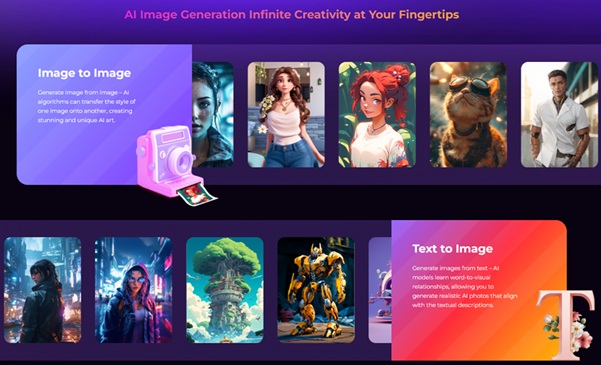
With the latest update, HitPaw FotorPea has become a workspace for all creators with seamless support for both image-to-image edits and text-to-image generation enabling the creation of professional images from any input.
Image-to-Image: Transform Without Losing Identity
You can upload an image to change it into:
- A 3D character
- A cinematic portrait
- Retro Polaroid
- A clear product photo
- A fantasy character
- A miniature style scene
The style can change, while the significant traits and the facial structure remain the same.
Text-to-Image: Create Something New From Pure Imagination
Describe what you have in mind, and Nano Banana Pro translates it into a high-quality crisp artwork, for example:
- “A wooden cozy cabin with warm evening lights”
- “A cyberpunk style portrait with colorful neon”
- “A luxury product photo with shadows”
The new nano-banana ai engine will deliver quality results based on your provided description.
Why Nano Banana Pro Works So Well in HitPaw FotorPea
In HitPaw FotorPea, the Nano Banana image editing works with even greater efficiency because the platform prioritizes ease of use, speed, and user intuition. The platform and the model together streamline the process so that the user can create and edit images in seconds.
Fast, Smooth, and Beginner-Friendly
Skillful editing is not needed to produce high-quality images. HitPaw FotorPea is designed to be simple. Upload a photo or type a prompt, choose the Nano Banana Pro model, and start refining the image.
Multi-Round Editing for Better Accuracy
Rather than generating new images to constantly iterate the design, you can hone in on a single image and make changes step by step by prompting the model and providing specific modifications like,
- Make the hair more detailed.
- Add a cooler color palette.
- Add some fog to the background.
- Make the expression more joyful.
The model keeps the image intact while offering the original one updated to reflect the prompt requests.
Perfect for Social Media and Online Creators
Online content creators are often in a time crunch as they have multiple platforms to post on, such as Instagram, YouTube, and TikTok. HitPaw FotorPea helps them achieve a professional look in no time. Users can very quickly create aesthetic scenes, profile photos, thumbnails, ads, and product images without the need for other apps.
Useful for E-Commerce, Brands, and Marketing
The Nano Banana is most effective when it is used for business visuals. Its sharp, detailed, and versatile designs allow it to be useful for E-Commerce, brand development, and marketing teams.
Cleaner Product Photos for Online Listings
Brands can enhance the texture of products, eliminate distractions in the background, soften the shadows, or used modified photos from professional lifestyle photos. Consistent clarity in photos is important for store pages and marketing campaigns.
Faster Workflow for Teams
There is no need to have multiple editing apps open, as everything is done in HitPaw FotorPea’s interface. Teams can:
- Improve the quality of products
- Maintain a consistent brand visual
- Create promotional visual assets
- Prepare content for a banner
- Make graphics for social media
Trend-Driven Templates That Perform Well
HitPaw FotorPea has ready-to-edit style templates designed for Nano Banana Pro. Templates include:
- AI couple photography
- Cinematic style portraits
- Ghostface-themed images
- 3D style toy figures
- Vintage look filters
- Miniature scenes
These templates help users achieve trendy styles of editing that have gone viral in seconds.
Final Thoughts
The Nano Banana Pro feature inside HitPaw FotorPea offers a smoother, smarter, and cleaner experience when creating images. With a better understanding of prompts, response speed, and overall output quality, it is simply better at turning ideas into beautiful images. Whether transforming a photo into something else or generating a new image from scratch using text, Nano Banana Pro will help you create images that are sharp, modern, and professional with ease.
FAQ’s
1. What is Nano Banana Pro in HitPaw FotorPea?
Nano Banana Pro is one of the advancements of AI within Hitpaw Fotorpea. It offers sharper generations, cleaner edits, and more precise and accurate stylings and sketches than any of its predecessors.
2. How is Nano Banana Pro different from the original Nano Banana model?
This new version of the model has far better overall clarity, enhanced recognition of prompt requests, higher texture quality, and more consistency of faces. It also tends to perform better when it comes to more detailed and complex styles.
3. Can Nano Banana Pro be used for editing my existing photos?
Absolutely! Any photo can be uploaded to undergo the enhancement of Nano Banana Pro through background alterations, transformations of styles, revisions of colors, or detailed editing of Nano Banana images.
4. Does Nano Banana Pro also support text-to-image creation?
Yes, you can enter a prompt, describe what you want to generate, or what style you want to use, and the model will create a new image from text using the improved nano-banana ai engine.
5. Who can benefit the most from Nano Banana Pro?
Content creators, owners of online shops, brands, designers, marketers and anyone who wants quality Ai visuals without the need to learn how to edit professionally.