
Top 8 AI Editing Software That Can Change a Person's Voice in 2025

Image Source: depositphotos.com
Having worked extensively in audio production and voice-based media, I evaluate every voice changer with a professional, meticulous testing process. I focus on realism, interface usability, and editing precision. Over the years, I've tested most major desktop voice editors, examining how accurately they reproduce natural tones and avoid robotic or distorted outputs. Only a few programs truly balance advanced functionality with user-friendly controls.
After careful testing, I've selected the top voice changers that deliver consistent, realistic results. These tools combine AI, sound processing, and professional controls to transform voices naturally. Whether for podcasts, character work, or creative projects, the right software enhances authenticity and workflow. Among these, CapCut stands out as an intuitive, powerful option for professional-quality voice editing.
The Best AI Voice Editing Software — Ranked Directory of Top Picks
- CapCut — best for fast, creator-friendly AI voice editing and voice generator options
- Voice.ai — best for realistic real-time voice conversion and voice cloning
- MorphVOX Pro — best for low-latency live voice morphing in games and streams
- Altered Studio — best for professional voice cloning and studio-grade conversion
- AV Voice Changer Diamond — best for batch processing and legacy voice morphing
- iZotope VocalSynth 2 — best for creative vocal effects and sound design
- Krotos Dehumaniser — best for creature and cinematic vocal transformation
- Antares Auto-Tune Pro — best for pitch correction and stylized vocal effects
1. CapCut
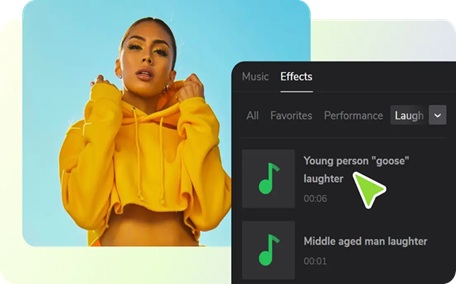
CapCut offers one of the most convenient but sophisticated AI voice editing experiences on PC. It has become unique due to its quick performance, lively interface and extensive array of audio effects. The platform's voice generator and AI voice conversion tools are ideal for beginners and creators alike. It can be easily exported with TikTok and YouTube, and the dashboard based on the cloud allows collaboration within the team and managing files. New users of CapCut also receive 5 GB of free cloud storage which can be expanded to professional workloads. CapCut has already gained popularity with content creators, editors, and hobbyists who prefer an easy-to-use but smart automation approach over complex software.
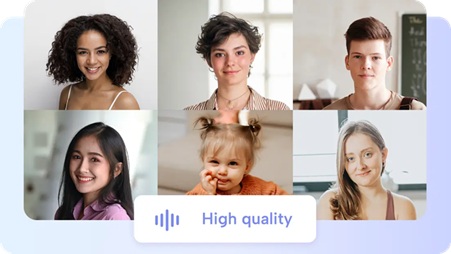
CapCut's Unique Capabilities
- Large Effects Library: CapCut offers a massive collection of effects to instantly modify voices, adding creative twists like pitch changes or stylistic enhancements.
- Prebuilt Voice Presets: Ready-to-use voice presets such as robot, chipmunk, and elf make it easy to give characters or narrations a unique sound without manual adjustments.
- Noise Reduction&Restoration: Built-in tools reduce background noise and perform basic audio restoration, ensuring clean, professional-sounding recordings.
- Collaborative Project Dashboard: The dashboard supports team collaboration with a shared workspace and cloud sync, streamlining project management across devices.
- Free Cloud Storage: Sign up grants 5 GB of cloud storage, upgradeable for users with heavier workloads, allowing safe storage and easy access to projects.
- Export Presets for Social Media: Built-in export options optimize videos for TikTok, YouTube, and other platforms, making sharing fast and hassle-free.
Advantages
- Extremely fast setup for beginner and creator projects.
- Friendly interface reduces the learning curve dramatically.
- Good cross-platform export for social media distribution.
- Free tier provides practical tools for many projects.
- Team workspace supports collaborative voice editing workflows.
Disadvantages
- Some features require pro account to access.
2. Voice.ai
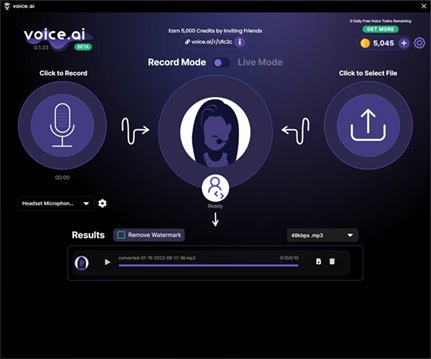
Voice.ai is a high-quality and real-time AI voice conversion. The software is locally operated in Windows PCs and allows real-time result in chat rooms, gaming, or streaming platforms. It enables users to explore different tones and personalities with its expanding list of pre-built voice options. It also facilitates personalized voice cloning, with custom models capable of being trained to be used in many projects. Another strength is privacy because it is assisted by the local runtime to protect sensitive data.
Advantages
- Real-time latency is low for live environments.
- Large selection of prebuilt voice choices available.
- Voice cloning offers future-proof reuse of voice assets.
- Integrates with common communication and streaming tools.
- Local runtime options improve security for sensitive projects.
Disadvantages
- High-quality clones may require powerful hardware.
- Some advanced features locked behind premium tiers.
- Voice library quality varies across options.
3. MorphVOX Pro
MorphVOX Pro is designed to satisfy the needs of gamers, streamers, and live performers who require prompt and smooth voice processing. It provides low CPU consumption and almost no latency, and is a very good option when it comes to live chats or commentating on games. The software also has voice learning features which enhance audio realism with time. Live performances are also more immersive with a range of themed voice packs and environmental effects.
Advantages
- Very low CPU footprint for live use.
- Plenty of themed voice and ambient packs included.
- Background audio options create immersive contexts.
- Simple routing to games and chat programs.
- Stable performance on modest hardware.
Disadvantages
- Processing quality lags behind newer AI models.
- Interface looks dated compared to modern editors.
- Limited deep editing and cloning capabilities.
4. Altered Studio
Altered Studio is a company that specializes in AI voice cloning at the professional level in the studio and in business. It enables users to create, by short recordings, realistic voice models. It also has speech-to-speech conversion, TTS, and strict editing features, which is why it is applicable to commercial projects like games, advertising, and podcasts. It is a professional solution which is polished and flexible as well as faithful.
Advantages
- Proven cloning quality for studio deliverables.
- Integrated TTS and speech-to-speech pipelines.
- Workflow built for iteration and quick revisions.
- Commercial licensing tailored to production needs.
- Desktop compatibility for Windows and macOS.
Disadvantages
- Full feature set often behind higher subscription tiers.
- Short-model cloning may need refinement for perfect matches.
5. AV Voice Changer Software Diamond
AV Voice Changer Software Diamond has a long history in the voice-editing industry. It integrates morphing, waveform editing and batch processing within a single platform. The user is able to manipulate pitch, timbre and formant to produce desired effects. It works especially well with automated file processing and conversion of libraries.
Advantages
- Batch morpher can process many files automatically.
- Waveform editor allows quick manual fixes.
- Preset library helps jumpstart common transformations.
- One-time license options exist for budget control.
- Good for voice-over libraries and archives.
Disadvantages
- User interface can be unintuitive for newcomers.
- Some algorithms sound dated compared to newer AI rivals.
- Limited native AI cloning capability.
6. iZotope VocalSynth 2
iZotope VocalSynth 2 is aimed at sound designers and musicians. It has several modules such as Vocoder, Biovox, Polyvox and Compuvox which can be stacked together to produce layered and expressive vocal effects. The creative manipulation ability of the plugin is more suitable in artistic production, music mixing, and game audio as opposed to natural voice replication.
Advantages
- Exceptional at producing unique, musical vocal textures.
- Module-based routing enables complex sound design.
- Stompbox-style effects streamline experimental workflows.
- Designed for integration with major DAW hosts.
- Works well for soundtrack and game voice design.
Disadvantages
- Not primarily designed for straight voice cloning.
- Can be CPU-heavy with many modules active.
- Requires a DAW host for full use.
7. Krotos Dehumaniser
Krotos Dehumaniser is aimed at sound designers in film and game. It provides a node-based system which enables users to mix effects in real-time. The preset bank contains hundreds of creature and mechanical voice designs, including monsters to robots. MIDI control provides expressive performance and that makes it a populartool among cinematic audio professionals.
Advantages
- Immediately produces cinematic creature voices with minimal setup.
- MIDI mapping adds musical expressivity to effects.
- Hundreds of presets speed up production workflows.
- Real-time performance mode suits ADR and Foley tasks.
- Strong for film and game sound design.
Disadvantages
- Highly specialized; not ideal for natural voice tasks.
- Higher price compared to consumer voice changers.
- Learning curve for complex signal routing.
8. Antares Auto-Tune Pro
Industry standard Pitch-correction and creative vocal effects Pitch-correction and creative vocal effects The standard in the industry is Antares Auto-Tune Pro. The program also offers automatic and manual fine-tuning vocals. The Graph Mode of it enables finer pitch and timing adjustments, whereas the Auto Mode is known to provide the iconic Auto-Tune effect. It is perfect with singers, producers, and engineers who require professional and constant vocal correction.
Advantages
- Industry-grade pitch correction and timing adjustments.
- Graph Mode enables detailed pitch editing and automation.
- Presets allow rapid deployment of iconic vocal effects.
- Tight integration with pro DAW workflows.
- Low-latency Auto mode suits live tracking.
Disadvantages
- Not focused on full voice identity cloning.
- Can be expensive for casual users.
- Requires DAW or host for full capabilities.
Side-by-Side Comparison of AI Voice Editing Software 2025
|
Software |
Best for |
Core standout features |
Pricing |
|
CapCut |
Creator-friendly AI voice editing |
Fast presets, cloud sync, built-in voice generator, export presets. |
Standard (Free) Paid: Starts at $19.99/month (Pro) |
|
Voice.ai |
Real-time conversion and cloning |
Real-time conversion, large voice library, local runtime options. |
Free download; Premium tiers for advanced features: $9.99/month or $99/year |
|
MorphVOX Pro |
Live low-latency morphing |
Low CPU use, voice learning, ambient backgrounds. |
One-time license: $39.99; Pro tier: $59.99 one-time |
|
Altered Studio |
Studio voice cloning |
Rapid cloning, TTS, speech-to-speech pipelines, licensing. |
Subscription or enterprise plans: $29/month or $299/year |
|
AV Voice Changer Diamond |
Batch processing&editing |
Batch morpher, waveform editor, deep morph controls. |
One-time license: $99.95; Trial available |
|
iZotope VocalSynth 2 |
Creative vocal textures |
Vocoder, Polyvox, Biovox, stompbox-style effects. |
Plugin pricing: $199; Bundle options available |
|
Krotos Dehumaniser |
Creature and cinematic voices |
Modular nodes, MIDI control, cinematic presets. |
Premium professional pricing: $199 one-time |
|
Antares Auto-Tune Pro |
Pitch correction and stylized vocals |
Graph Mode, real-time Auto Mode, professional presets. |
Perpetual license: $399 or subscription: $24.99/month or $199/year |
Conclusion
Everyone selects tools based on his or her creative objectives. Others require high quality cloning and others require easy and entertaining voice effects. Among the tested alternatives, the most balanced platform is CapCut. Its AI-driven voice generator, intuitive interface, and generous free plan make it a practical choice for beginners and content creators. Voice.ai and Altered Studio are professional-grade cloning and live transformation, and MorphVOX Pro manages live streaming flawlessly. VocalSynth 2 and Krotos Dehumaniser are the best in creative design, whereas Auto-Tune Pro is the most popular in pitch correction. However, in case a single recommendation has to be given, I would primarily suggest CapCut- it combines simplicity, AI, and teamwork within a single unified platform.
FAQs
Are these programs safe for commercial use?
Licensing varies by software. CapCut permits many creator uses, but for commercial projects, always confirm licensing terms. Altered Studio and Voice.ai include professional licensing for enterprise or studio use.
Can CapCut replace a professional voice actor?
CapCut is great for creators needing quick transformations or AI-generated voiceovers. However, professional actors still bring emotional depth and interpretation that software can't fully replicate. Combining both offers the best results.
Which software works best for live streaming with low latency?
Voice.ai and MorphVOX Pro perform best for real-time streaming. CapCut focuses on post-production editing, not live processing, but it's ideal for polished uploads afterward.
Is a powerful PC necessary for AI voice conversion?
High-quality cloning or real-time processing often needs a strong CPU or GPU. CapCut runs efficiently for most users, while more advanced tools like Voice.ai or Altered Studio may benefit from higher specs.