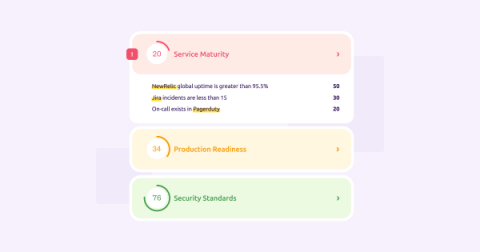
A developer portal is a single pane of glass that shows specifications, key parameters, and technical information about software development. Read on to learn how to set one up.
The onboarding experience sets the tone for a new developer — beyond the interview process, this will be the developer’s first impression of the company and the job. The onboarding process should be thoughtfully designed and should give the developer the tools they need for success and autonomy. Before you start crafting your onboarding process, think back to your first few days at the organization.
It’s been an incredible year — there’s no better way I can sum up my thoughts as I reflect on 2022. At Cortex, we are extraordinarily grateful for the opportunities that last year brought us. As the holiday season comes to an end, I wanted to take a moment to share some thoughts with all of you.
The weather’s getting colder, the days are getting shorter, and we’re looking back on a year of change and growth with gratitude in our hearts. As we get ready for the new year, we wanted to share some of the ways in which we saw users expand what’s possible with Cortex in 2022, and highlight some of our favorite new features.
It is no secret that microservices architectures lend themselves to complexity. This can be a small price to pay when your workflows and processes are organized to ensure that everyone on the team is informed, accountable, and content. Setting up an internal developer portal is one of the best things you can do for the team, as it is an easy, surefire way to get your services, resources, and processes in order.
One of the most needlessly time-consuming tasks that your team members can engage in is looking for information on work that has already been done by somebody else. Perhaps a developer is seeking to perform an oft-repeated task like the creation of a new microservice. Or a new employee on the team needs guidance regarding designing a product roadmap and wants to look at one that was made for a similar project.
There is no denying that incident management is one of the most crucial processes concerning the service and business aspects of software deployment. Not having a robust system in place to address and remedy unfortunate incidents can lead to user dissatisfaction, which can ultimately take a toll on your business metrics. A suboptimal management system can also have adverse impacts internally if it prioritizes efficiency and speed of recovery to the point of neglecting employee well-being.
An on-call schedule forms the backbone of your incident response system in the event of an outage or when an issue is raised. This type of schedule does not keep end-users waiting and helps maintain the reliability and availability of your software. However, on-call management practices often induce worry and anxiety in team members. In extreme cases, it can even be a contributing factor in employee burnout.
Reporting is essential when managing a microservice architecture. Without some kind of reporting tool, it’s significantly more difficult to gain insight into how services and resources are functioning. Software teams need this insight in order to make meaningful progress — without reporting, it’s hard to even know where progress needs to be made. With the introduction of CQL reports, Cortex gives you more visibility than ever before.
The service catalog is an indispensable component of a team’s software development infrastructure. Anything you need to know about your microservice architecture - whether it is knowing who owns a particular service or what another service’s dependencies are - lives inside this repository. Its potential, however, is not limited to being a storehouse for all the data about your microservices.