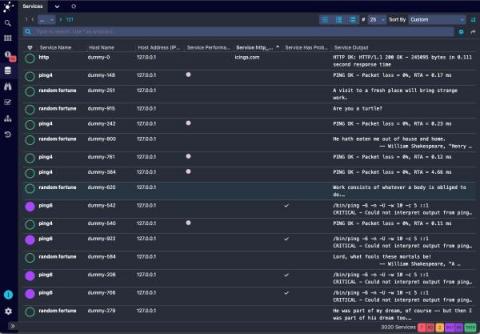
List View in Icinga DB Web
Similar, to the monitoring module in Icinga Web, Icinga DB Web also provides list views for hosts and services to provide the most common columns to reduce the backend query load.


Similar, to the monitoring module in Icinga Web, Icinga DB Web also provides list views for hosts and services to provide the most common columns to reduce the backend query load.
After some drawbacks we are very happy today to finally release Icinga for Windows v1.10.0! The past weeks we have spent a lot of time to polish this release, test many different aspects and optimize the user experience in general. Please make sure to read the upgrading docs carefully, before upgrading to v1.10.0. Otherwise, your installation might not work as expected, or Icinga for Windows might not load anymore.
This time I want to show a feature that’s not obvious at first sight, but can save a lot of time, when you’re intending to create UI mockups with realistic data.
Today’s blog post will give an insight into one of the many things that improved with Icinga DB: how host and service history is written to the database, both by the old IDO feature, as well as what has changed with Icinga DB and how this leads to more reliable results.
Infrastructure monitoring is used to collect health and performance data from servers, virtual machines, containers, databases, and other backend components in a tech stack.
Many Icinga users favour the Icinga Director to manage their Icinga configuration. Icinga Director comes with many features to enable you to create and modify Icinga configuration through the web interface. One outstanding feature of Icinga Director is the Activity and Deployment log. It tracks every configuration change and allows you to see who changed what at which time. You can roll back to older versions of your configuration at any time.
It has been a while since we published some news regarding Icinga for Windows – that’s why we would like to tell you one month ahead about a big change which follows with version 1.10 in August.
Last week we released the final first version of Icinga DB and its web interface module Icinga DB Web. Icinga DB Web offers many new features and a completely new design. The monitoring module has its limitations when managing a role, as it handles permissions and restrictions separately. This means that the permissions for a role are not related to the restrictions of the role To understand this better, here is an example.
We are proud of our many customers and users around the globe that trust Icinga for critical IT infrastructure monitoring. That´s why we´re now showcasing some of these enterprises with their Success stories. It´s stories from companies or organizations just like yours, of any size and different kinds of industries. Some of them are our long-standing customers, others have just recently profited from migrating from another solution to Icinga.
We couldn’t be happier and are proud to announce the final release of Icinga DB today. After many years of development and one or the other setback on the way to the release, we are proud to finally hand you the final version of Icinga DB for your monitoring environment.