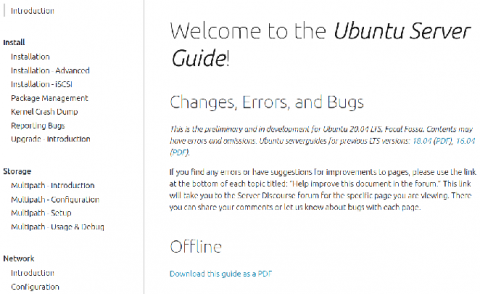
With the release of Ubuntu 20.04 LTS (Focal Fossa) the Ubuntu Server Guide has received a major set of updates and has moved to a new location on the Ubuntu website. The new location makes it much easier to read and contribute improvements. There is a link on the bottom of each page that points directly to the corresponding Discourse page which contains the source for each page of the Ubuntu Server Guide.
The release of Ubuntu 20.04 LTS was April 23, 2020. On the same day, Canonical added full support for Ubuntu Server 20.04 on all of the Raspberry Pis that we certify. Users can flash 20.04 to their Raspberry Pi knowing Canonical guarantees it will ‘just work’ and can make the most out of all of the new features added with 20.04. You can do this from our download page, or from the Official Raspberry Pi Imager tool.
Web applications like knockout.js help you to reach out to your audience and customers. And as your customer base increases, your web-application evolves so that you can cater to their varying needs. But the more features you introduce in your application, the more requests and responses need to be handled by your applications. That, coupled with design (CSS) can make your web applications pretty bulky. You must be thinking, “So what!
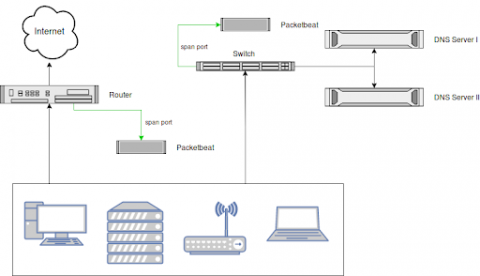
Monitoring all DNS requests in your network, including those that were blocked by (e.g., by a firewall) is a great way to increase visibility, enforce compliance and detect threats. A common problem with collecting DNS logs is that DNS server logs are notoriously hard to parse. Also, parsing only the logs of your DNS servers leaves a blind spot when it comes to usage of, or the attempt to use, an external DNS server like Google's 8.8.8.8.
Subkeying is a way to group a set of crashes at some level other than the top level of the call stack. Subkeying is a way to group a set of crashes at some level other than the top level of the call stack. At BugSplat, crashes are grouped by a stack key and groups of crashes can be found on the Summary page. By Default, BugSplat groups crashes using the topmost level of a call stack. A subkey is created when crashes are grouped at a level other than the top level of a call stack.
If you're reading this, you're probably wondering how to get data from various Microsoft Azure services into Splunk. With the growing list of Azure services and various data access methods, it can be a little cloudy (pun intended) on what data is available and how to get all that data into Splunk. In this blog post, I'm going go over how Microsoft makes Azure data available, how to access the data, and out-of-the-box Splunk Add-Ons that can consume this data. So let's dive right in.
The Splunk Security Research Team has been working on new improvements and additions to the Splunk Attack Range, a tool that allows security researchers and analysts to quickly deploy environments locally and in the cloud in order to replicate attacks based on attack simulation engines. This deployment attempts to replicate environments at scale, including Windows, workstation/server, domain controller, Kali Linux, Splunk server and Splunk Phantom server.
As more environments run on Kubernetes—including our own— Datadog has been making it easier to get visibility into clusters of any scale. To minimize load on the Kubernetes API server, the Datadog Agent runs in two different modes. The node-based Agent queries local containers or external endpoints for data, while the Cluster Agent fetches cluster-level metadata from the API server.