Operations | Monitoring | ITSM | DevOps | Cloud

Instrumenting Our Frontend Test Suite (...and fixing what we found)

Here at Sentry, we like to dogfood our product as much as possible. Sometimes, it results in unusual applications of our product and sometimes these unusual applications pay off in a meaningful way. In this blog post, we’ll examine one such case where we use the Sentry JavaScript SDK to instrument Jest (which runs our frontend test suite) and how we addressed the issues that we found.

What's new in Sysdig - July 2021

Welcome to another monthly update on what’s new from Sysdig! Happy 4th of July to our American audience, and bonne Bastille to our French friends. It’s been heating up in the northern hemisphere, so we hope you’ve all been managing to stay cool and safe. Our team continues to work hard to bring great new features to all of our customers, automatically and for free! The big news this month is our intent to acquire Apolicy, which has everyone full of excitement.

Developer's Dilemma: When Is the Right Time to Invest in Log Management

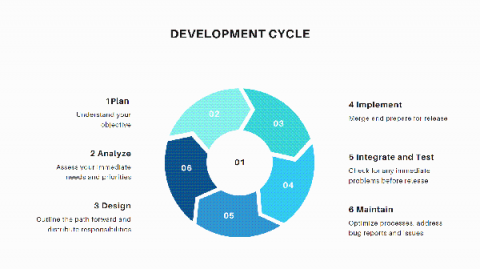
Development cycles are complicated. If you’re on a development team, whether you’re building out a custom application, maintaining and iterating on a growing microservice, or breaking ground on a new platform for a startup, you have your hands full. Log management, though seldom celebrated outside hardcore DevOps and IT circles, is still a well-known instrument among seasoned developers. It is insight into the internal workings of your processes as they are used.

Splunk SOAR Feature Video: Custom Functions

Splunk SOAR’s custom functions allow shareable custom code across playbooks and the introduction of complex data objects into the playbook execution path. These aren’t just out-of the-box playbooks, but out-of-the-box custom blocks that save you time and effort. This allows for centralized code management and version control of custom functions providing the building blocks for scaling your automation, even to those without coding capabilities.

Splunk SOAR Feature Video: Contextual Action Launch

Splunk SOAR apps have a parameter for action inputs and outputs called "contains". These are used to enable contextual actions in the Splunk SOAR user interface. A common example is the contains type "ip". This is a powerful feature that the platform provides, as it allows the user to chain the output of one action as input to another.

Splunk SOAR Feature Video: Configure Third Party Tools

To get started in Splunk SOAR, you will need to configure an asset. Assets are the security and infrastructure assets that you integrate with the Splunk SOAR platform, like firewalls and endpoint products. Splunk SOAR connects to these assets through apps. Apps extend the platform by integrating third-party security products and tools.