Strengthen your monitoring game with Grafana 9
Aiven now offers Grafana® 9 as a managed service. Let’s take a look at how we’re bringing it to you and what the key improvements are.


Big data and its capabilities are becoming more prevalent across various sectors and market segments. It gives businesses and entrepreneurs access to previously unheard-of potential for process optimization, service quality improvements, and conversion rate growth. Big data was once a cutting-edge technology for extremely complicated work environments, but nowadays, it's getting increasingly popular in commercial sectors. Big data is large, varied information sets that are expanding exponentially.
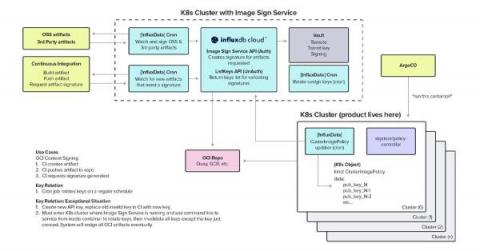
One of InfluxData’s main products is InfluxDB Cloud. It’s a cloud-native, SaaS platform for accessing InfluxDB in a serverless, scalable fashion. InfluxDB Cloud is available in all major public clouds. InfluxDB Cloud was built from the ground up to support auto-scaling and handling different types of workloads. Under the hood, InfluxDB Cloud is a Kubernetes-based application consisting of a fleet of micro-services that runs in a multi-cloud, multi-region setup.
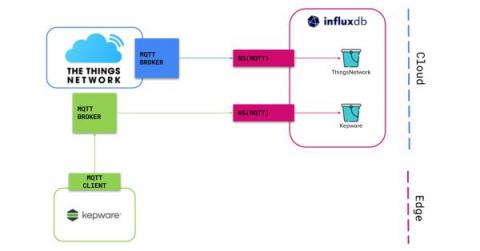
Learn how to deploy InfluxDB Cloud’s Native Collectors with Kepware and the Things Network. In Part 1 of the blog series, we discussed connecting Kepware to InfluxDB using the new InfluxDB Cloud feature Native Collectors! As promised, let’s now discuss how to connect an Enterprise IoT platform, The Things Network to InfluxDB. Before we get to the juicy tutorial let’s run through a quick reminder.
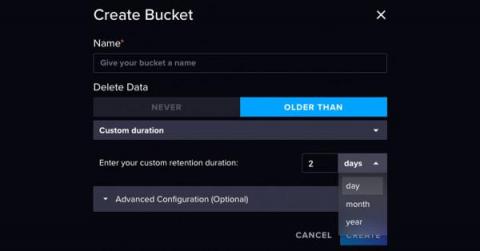
We love to write and ship code to help developers bring their ideas and projects to life. That’s why we’re constantly working on improving our product to meet developers where they are, to ensure their happiness, and accelerate Time to Awesome. This week, we are covering a product release that we think will save you time and effort when using InfluxDB with data retention requirements.
For many workloads, using a time series database is a smart choice that saves time and storage space. Developers and companies have more database choices than ever. Choosing the right database for a project saves time when writing and querying data. As companies work with larger datasets to make increasingly intelligent and automated systems, efficiency is key. For many workloads, using a time series database is a smart choice that saves time and storage space.