Operations | Monitoring | ITSM | DevOps | Cloud

How to Hold Your ISP Accountable: Network Monitoring for Schools & Multi-Site Public Institutions

The Internet at one of your school sites slows to a crawl. Teachers can't load their lesson plans. A video call for a virtual class freezes. Your IT team calls the ISP. The ISP runs its own checks and tells you everything looks fine on their end. Sound familiar? This is the core problem every school board and public institution runs into eventually. Your ISP has full visibility into their own network. You don't.

How to Troubleshoot High CPU Usage on Network Devices

Most network teams only find out their firewall is overloaded after users start complaining. A slow VPN, dropped calls, and random packet loss at 2 pm every day. The usual suspects get blamed first: the ISP, the switch, the application server. The firewall gets a pass because the dashboard says 40% CPU and everything looks fine. Here is the problem with that picture. Standard SNMP monitoring polls every 5 minutes. A CPU spike that peaks at 95% and recovers within 90 seconds never shows up.

Devolutions Makes an Important Investment in Obkio

Obkio is proud to announce an important investment from Devolutions, one of the most respected names in IT security and remote access management. This investment marks a new chapter for Obkio as we accelerate our next phase of growth. This isn't a financial transaction between strangers. It's a partnership between two companies that have spent years building tools for the same people: IT professionals, sysadmins, MSPs, and the network engineers who keep critical network infrastructure running.

What Is Internet Congestion and How to Fix It

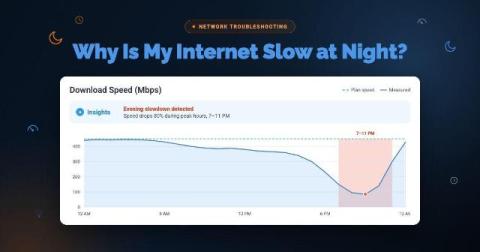
Your VoIP calls are choppy. File uploads are crawling. Your team is complaining that the CRM is sluggish, and remote desktop sessions keep freezing. You check your firewall, your switches look clean, and there are no alerts on your LAN. The problem isn't inside your network. It's upstream, and it's happening quietly every day during peak hours.

How to Identify LAN Issues (Local Area Network Problems)

Here is a reality that every network admin eventually runs into: users report slow apps, dropped calls, and broken connections, and the first instinct is to blame the ISP or the cloud provider. The ticket gets escalated, the ISP pushes back, and hours later, you find out the problem was sitting inside your own building the whole time. A saturated switch port. A misconfigured VLAN. A flaky patch cable in the server room.

Obkio Microsoft Teams Monitoring vs. Microsoft Teams Admin Center

Most IT teams rely on Microsoft Teams Admin Center as their default monitoring tool to find and fix Microsoft Teams issues, but there's a gap between what it shows and what actually causes call quality problems. Teams Admin Center gives you Microsoft's perspective on what happened after an MS Teams call ended. It doesn't tell you what was happening on your network, on your users' devices, or in the five minutes before the complaints started coming in.

What Is Mean Time to Resolve (MTTR)? (And How to Improve It)

Every minute a network incident goes unresolved costs your company money. Lost productivity, missed SLAs, degraded user experience, and, in other cases, direct revenue loss. For IT teams and network admins, the pressure to resolve incidents fast isn't just operational, it's existential.

Network Instability: What It Is, What Causes It, and How to Fix It

Network outages are easy. Something goes down, alarms fire, you fix it, life moves on. Everyone understands a full outage. It's clean, binary, and at least somewhat predictable. Network instability is the opposite of all that. Nothing fully breaks. Nothing fully works. The ping responds. The connection shows active. And yet users are complaining about choppy calls, sluggish apps, and sessions dropping for no apparent reason. You run a speed test, and it's fine.

HTTP Monitoring: What Is It and How to Do It

When users complain that an app or website is slow, the first question is always the same: Is it the network or the application? HTTP monitoring gives you the answer. Network metrics like latency and packet loss tell you what's happening on the wire. But they don't tell you whether users are actually feeling the impact. HTTP monitoring closes that gap.