Today, IT and site reliability engineering (SRE) teams face pressure to remediate problems faster than ever, within environments that are larger than ever, while contending with architectures that are more complex than ever. In the face of these challenges, artificial intelligence has become a must-have feature for managing complex application performance or availability problems at scale.
For IT Operations and Site Reliability Engineering (SRE) teams, logging is nothing new. In fact, collecting and analyzing logs is one of the oldest cornerstones of performance management. Logs have been part and parcel of APM workflows for decades. Yet the logging strategies that worked in eras past often fall short today. That’s thanks to the advent of cloud-native computing, which has ushered in fundamental new challenges in the way teams aggregate, analyze, and manage logs.
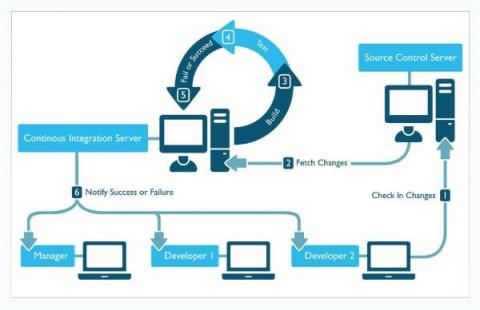
In this blog post, we will walk you through how to develop a continuous performance management playbook for your business to effectively integrate and manage performance as an integral part of your development process – enabling you to build fast experiences faster than your competition. Let’s dive in!
When it comes to learning from incidents, your tools should adapt to the way your organization works. Many of you conduct your retrospectives in rich-text document editing tools, like Google Docs. That’s why we’ve introduced the option to export your retrospectives to Google Docs. Retrospective export to Google Docs can be automated as part of your incident management process with a Runbook step.
Our amazing user community is growing so fast that we want to give you more resources to learn and share your knowledge and experience with others. So…today we launch Cribl Curious! Curious is a Q&A site for asking and answering technical questions about Cribl Stream, Cloud, Edge, Packs, and AppScope. Goat a question about how something works in Cribl? Come on over to see how your peers have solved similar problems. Checked the docs and it’s just not clicking for you?
Learn more and schedule a 1:1 demo at at https://www.densify.com/product/demo
Quality control and observability of your platform are critical for any customer-facing application. Businesses need to understand their user’s experience in every step of the app or webpage. User engagement can often depend on how well your platform functions, and responding quickly to problems can make a big difference in your application’s success. AWS Canaries can help companies simulate and understand the user experience.