Operations | Monitoring | ITSM | DevOps | Cloud

Monitoring InfluxDB 2.0 in Production and at Scale

One of the great things about InfluxDB is that it is really easy to get up and running, and it doesn’t require much monitoring when you are dealing with datasets that fit well on your local dev machine. Once you start using InfluxDB in production and pushing orders of magnitude more data into the system, it’s critical to monitor how your instance is performing so that you can proactively respond to things like disk or network failures, memory saturation, and write or query loads.

InfluxDB Cloud is on Microsoft Azure Marketplace

Here at InfluxData, we’ve been focusing recently on deepening our support for Microsoft Azure. First we turned on InfluxDB Cloud on Azure West Europe, in Amsterdam, back in July. Then we launched InfluxDB Cloud on Azure East US, in Virginia, in September. Today, we’re pleased to announce that InfluxDB Cloud joins InfluxDB Enterprise on Azure Marketplace.

Creating a Day of Week Runtime Field and Using It in Kibana

The video contains a demonstration of the creation of a runtime field in which the day of the week is calculated from a timestamp field that contains the date. A visualization is then created in Kibana Lens using an indexed field and the newly created runtime field. Runtime field is the name given to the implementation of schema on read in Elasticsearch.

Shadow an Indexed Field With a Runtime Field to Fix Errors

The video contains a demonstration of using a runtime field to fix errors in the indexed data. We intentionally index documents with some errors, and then use a runtime field to shadow the indexed field. The demonstration shows how a user querying the data or creating a visualization in Kibana Lens will see the correct information, which is calculated in the runtime field. This scenario allows for immediate fixing of errors in the indexed data by shadowing them with runtime fields (instead of reindexing). Runtime field is the name given to the implementation of schema on read in Elasticsearch.

TL;DR InfluxDB Tech Tips - the Easiest Way to Use and Create InfluxDB Templates

If you didn’t already know, one of the perks of InfluxDB 2.0 is having access to templates. InfluxDB templates allow you to easily apply a variety of preconfigured resources including Telegraf configurations, buckets, dashboard, tasks, and alerts to your InfluxDB instance. In this TL;DR we’ll walk through the easiest way to use and create a template.

Elastic 7.11 released: General availability of searchable snapshots and the new cold tier, and the beta of schema on read

We are pleased to announce the general availability (GA) of Elastic 7.11. This release brings a broad set of new capabilities to our Elastic Enterprise Search, Observability, and Security solutions, which are built into the Elastic Stack — Elasticsearch and Kibana. This release enables customers to optimize for cost, performance, insight, and flexibility with the general availability of searchable snapshots and the beta of schema on read.

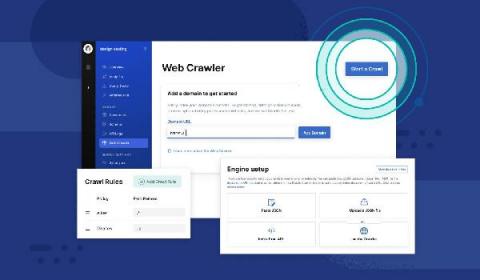
Introducing the Elastic App Search web crawler

In Elastic Enterprise Search 7.11, we’re thrilled to announce the beta launch of Elastic App Search web crawler, a simple yet powerful way to ingest publicly available web content so it becomes instantly searchable on your website. Making content on these websites searchable can take several forms. Elastic App Search already lets users ingest content via JSON uploading, JSON pasting, and through API endpoints.

Getting started with runtime fields, Elastic's implementation of schema on read

Historically, Elasticsearch has relied on a schema on write approach to make searching data fast. We are now adding schema on read capabilities to Elasticsearch so that users have the flexibility to alter a document's schema after ingest and also generate fields that exist only as part of the search query. Together, schema on read and schema on write provides users with the choice to balance performance and flexibility based on their needs.

Runtime fields: Schema on read for Elastic

In 7.11, we’re excited to announce support for schema on read in the Elastic Stack. We now offer the best of both worlds on a single platform — the performance and scale of the existing schema on write mechanism that our users love and depend on, coupled with a new level of flexibility for defining and executing queries with schema on read. We call our implementation of schema on read runtime fields.

Dynamically Created Runtime Fields

The video contains a demonstration of the creation of an index template that defines that unknown fields will be created as runtime fields. Documents are then indexed into an index that inherits from that template, and because these documents contain fields that are not defined in the template, the fields are automatically created as runtime fields (i.e. these fields are usable for search and aggregation, but are not indexed). Runtime field is the name given to the implementation of schema on read in Elasticsearch.