Operations | Monitoring | ITSM | DevOps | Cloud

SharePoint vs OneDrive: What Microsoft Cloud Service Is Best for You?

Microsoft has no shortage of online services, computer products, and digital platforms. The sheer amount of different offerings from the tech giant is enough to make anyone's head spin. When it comes to cloud services, the two Microsoft products that immediately come to mind are OneDrive and SharePoint. But what are the differences between SharePoint and OneDrive, and do you need both? Or can you get by with one? What cloud storage service should you invest in?

Building a Custom Grafana Dashboard for Kubernetes Observability

Distributed systems open us up to myriad complexities due to their microservices architecture. There are always little problems that arise in the system. Therefore, engineering teams must be able to determine how to prioritize the challenges. Viewing logs and metrics of such systems enables engineers to know the shared state of the system components, thereby informing the decision-making on what challenge needs to be solved most immediately.

4 easy ways to keep your knowledge base relevant and up to date

Knowledge is king in today’s information-driven business world, as most knowledge managers like me know. Having the right information at customers' fingertips can greatly influence their perception of the customer support experience. In today’s self-service world, a well-populated knowledge base with a reliable group of contributors is not enough to create a great experience. The content must be relevant and timely.

New Features and Enhancements in SQL Server 2022

In the era of technology defined by cloud computing, features evolve at the blinding speed of continuous deployment. When large software development organizations like Microsoft deliver semi-annual releases of products, like SQL Server, the volume of new features can be so large they can be hard to grasp. Microsoft continues to push the boundaries on what’s possible, both in on-premises and cloud data platforms, and they aim to make the life of data professionals much more manageable.

Deliver IT infrastructure faster with Continuous Delivery for Puppet Enterprise

Puppet Enterprise users can deliver infrastructure faster with Continuous Delivery for Puppet Enterprise. Watch this demo to learn how to automate testing and delivery of Puppet code from the commit all the way through deploying code into production.

Ensure quick and safe IT infrastructure changes with Puppet Impact Analysis

As your DevOps practice matures, and more users make more changes to infrastructure, it's essential that your changes are safe and deliberate. Impact Analysis is an extension of the core Puppet Enterprise installation. Watch our demo to learn how it provides the guardrails to operate quickly and safely at scale.

How Puppet Enterprise Does Desired State Automation at Scale

Learn how Puppet Enterprise keeps infrastructure secure, compliant, and efficient with desired state automation and configuration management. This video demonstrates how Puppet Enterprise simplifies infrastructure management by grouping nodes, using facts to assign servers automatically, and continuously enforcing desired configurations on every server based on system parameters.

When and Why To Adopt Feature Flags

What if there was a way to deploy a new feature into production — and not actually turn it on until you’re ready? There is! These tools are called feature flags (or feature toggles or flippers, depending on whom you ask). Feature flags are a powerful way to fine-tune your control over which features are enabled within a software deployment. Of course, feature flags aren’t the right solution in all cases.

Top Incident Response Metrics & How to Use Them

Two categories a software organization should always strive to improve in are: Data analysis is one way that your organization can improve the efficiency of incident management and overall application quality. However, the questions remain – which metrics should be collected? How can analysis of these metrics facilitate these improvements? Read on to hear about five key metrics essential to incident response.

Splunk 9.0 SmartStore with Microsoft Azure Container Storage

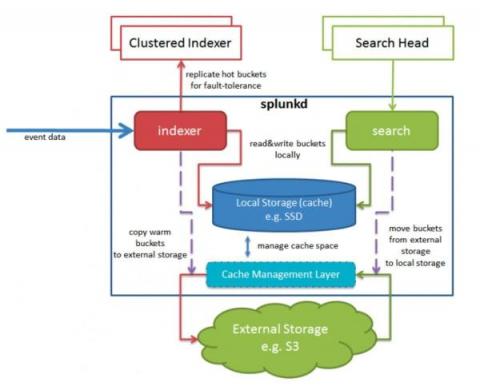
With the release of Splunk 9.0 came support for SmartStore in Azure. Previously to achieve this, you’d have to use some form of S3-compliant broker API, but now we can use native Azure APIs. The addition of this capability means that Splunk now offers complete SmartStore support for all three of the big public cloud vendors. This blog will describe a little bit about how it works, and help you set it up yourself.