Operations | Monitoring | ITSM | DevOps | Cloud

Prometheus Remote Write Support with InfluxDB 2.0

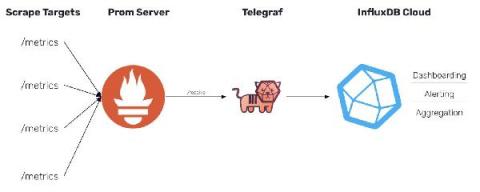
In InfluxDB 1.x, we provided support for the Prometheus remote write API. The release of InfluxDB 2.0 does not provide support for the same API. However, with the release of Telegraf 1.19, Telegraf now includes a Prometheus remote write parser that can be used to ingest these metrics and output them to either InfluxDB 1.x or InfluxDB 2.0.


SEMrush - Your End-to-end SEO Solution

In today’s digital age, keeping up with market trends is exactly what a business has to do to stay ahead. Creating a solid online brand image plays a key role in this task, and to do it, dedicated SEO efforts go a long way. Crafting targeted keywords that can direct traffic to your webpages can work wonders in capturing a widespread customer base. Now what if we were to tell you that instead of doing everything manually, you could rely on an automated tool to take care of things?

The evolving role of the CIO: Shaping the future of work

The role of the chief information officer (CIO) continues to evolve in response to an always-changing business environment. Through its unique position among the C-suite, the CIO is a strategic adviser who has historically been a highly influential and prominent figure for important decision-making across the enterprise.

Fine-tune network uptime monitoring with OpManager

Uptime monitoring has a direct impact on your organization’s ability to support end-users and deliver services. Not maintaining adequate uptime can interfere with business productivity and impact end-user satisfaction, eventually resulting in financial losses. Establishing uptime can be a challenging task since there are numerous factors that can act against it.

Failover Internet - What Your Business Needs To Know

With more of us online now than ever before, businesses across the world have become increasingly reliant on the internet. Essential IT infrastructures including emails, file-sharing platforms, POS systems, VoIP phones, and our new favorite collaboration tools Zoom and Teams all require an internet connection to use. Read on to understand how failover internet works, its benefits, what options are available, and why it should play a key role in your continuity planning.

How Siemens uses IoT sensor data and Grafana to optimize train maintenance, capacity, and more

There’s something special about the interactions a train journey generates — the interesting views and perspectives that inspire insights and drive new thinking. Martin Klimmek, Head of Digital Development and Operations at Siemens Mobility and Haluk Tutuk, Data Platform Engineer with Periscube, are among 20 data scientists, data engineers, and DevOps engineers building the next generation of data-powered customer service for the rolling stock industry in the U.K. and beyond.

What is a Branch in Git and How to Use It - Ultimate Guide

Developing a website or software isn't easy, a team of developers will be developing a new feature, other team will be testing whether the built feature works as expected, other might be fixing the bugs and so on. Managing these different versions of same code base must be a little tricky. Here comes the concept called branch in git which is used as a pointer to a snapshot of your changes. When we talk about branches in git these are the major questions that arises in our mind.

9 Possible Solutions To Fix a 502 Bad Gateway Error on Your WordPress Site

WordPress errors such as 502 bad getaway error frustrate and annoy the website owners and the users and visitors on your website. This is one of the most usual WordPress errors, and others such as the error establishing the database connection or white screen of death also create a lot of performance and other website issues. 502 bad gateway error is especially popular as it affects smaller websites and huge services such as Twitter, Gmail, CloudFlare experience this issue.

Establishing & Monitoring Your Microsoft Teams

To maintain effective Microsoft Teams performance, you must first understand two things: the metrics that define an optimal Microsoft Teams performance and where your Teams performance currently ranks against those metrics. By establishing a Microsoft Teams service quality baseline for your business, you can determine what is normal in terms of performance, and what isn’t. More importantly, you can identify where and when your focus should be to improve the overall user experience.