Operations | Monitoring | ITSM | DevOps | Cloud

Five worthy reads: Is your enterprise dealing with data sprawl properly?

Five worthy reads is a regular column on five noteworthy items we’ve discovered while researching trending and timeless topics. This week, we define what data sprawl is and how organizations can cope with it effectively. Data sprawl—defined as the proliferation of data into endpoints, servers, applications, BYODs, operating systems, network environments, and even other geo-servers—can be a challenge to monitor and control.

Monitoring Apdex with Scout APM

There is no doubt that looking at response times and memory usage is essential to understanding the general health and performance of your application. But as I am sure you are aware, there is more than one way to monitor an application. Approaching monitoring from a different angle can be a powerful way of gaining new insights. If all you did was watch for high response times or areas of memory bloat, then you might overlook something far more simple: the user’s general level of satisfaction.

Integrating Gitlab CI/CD with Sysdig Secure

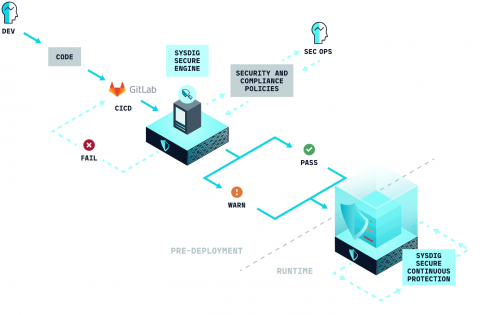
In this blog post we are going to cover how to perform Docker image scanning on the Gitlab CI/CD platform using Sysdig Secure. Container images that don’t meet the security policies that you define within Sysdig Secure will be stopped, breaking the build pipeline before being pushed to your production Docker registry.

Why Context is Critical in a Data-Driven World

Research firm IDC predicts that overall data volumes will grow from 33 zettabytes in 2018 to 175 zettabytes by 2025. 50% of the data will come from IoT devices and nearly 30% of the data will get consumed in real-time by 2025. The data economy has changed the game on how enterprises will need to work with digital technologies to become more effective, competitive, and innovative.

Gartner is fully in the cloud. Are you?

As many of you know, Gartner is recognized as one of the premier analyst firms by most enterprise IT organizations. Given the broad and diverse set of customers Gartner serves -- many risk averse and conservative towards new technologies, Gartner generally tends to recommend incremental and measured changes. Imagine our surprise when Gartner made this very bold statement "on-premises is the new legacy.

What Is MTTR? A Simple Definition That Will Help Your Team

Mean time to resolution (MTTR) is defined as the sum of the total amount of time that service was interrupted divided by the number of individual incidents. The unit of measurement is some quantity of time. Ideally, you can use minutes as the unit. That is, unless you blacked out the eastern seaboard for weeks!

Which is the Best CMS?

It’s never been easier to create your own website, or to start selling your products online. There is a wide range of Content Management Systems (CMS) for you to choose from, each offering its own unique set of features and functionality. You have probably already heard of many of the most well-known CMS, such as WordPress and Squarespace, but there are other less well-known platforms that may be more suited to your needs.

Five Tools for User Activity Monitoring

As discussed in our blog post [What is User Activity Monitoring?], user activity monitoring (UAM) is a form of surveillance that provides visibility and insight into employee productivity and engagement while also revealing insider security threats. While UAM on company-owned or company-sanctioned devices and networks is legal, ethical and HR considerations require that UAM be implemented with a high level of professionalism and sensitivity.

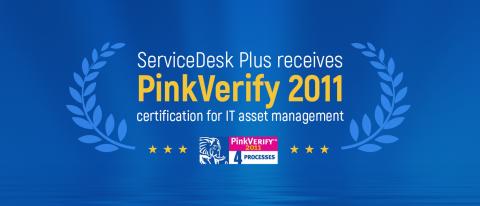
Exciting news about ServiceDesk Plus' IT asset management module

We’re delighted to announce that ServiceDesk Plus, our flagship IT service management (ITSM) solution, received PinkVERIFY 2011 certification for its IT asset management (ITAM) processes. This adds to ServiceDesk Plus’ existing PinkVERIFY certifications for its incident management, request fulfillment, and change management processes.

How to Send Log Files to AWS CloudWatch - Ubuntu

AWS CloudWatch allows you to collect log files such as the Apache2 access or error logs from your AWS EC2 instances. This is especially useful if you have a scaling group of instances behind a load balancer. Rather than connecting to each instance and manually searching the logs with grep, CloudWatch centralises the logs into one log stream, allowing you to search all your log files from one place.