Operations | Monitoring | ITSM | DevOps | Cloud

Get a live view of network performance with OpManager's Real-time Dashboard

Although network monitoring is an unenviable task, it must be done to sustain your network’s health. But what if you had a real-time report containing only key metrics, revealing how your network is doing without overloading you with information? This would (1) assure you that there are no aberrations in your network and (2) give you peace of mind.

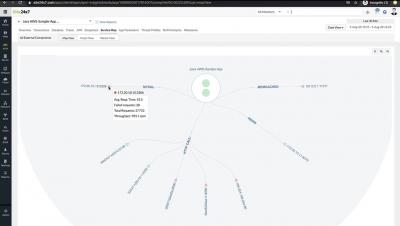
Monitoring Apache Web Server with Bleemeo

The Apache HTTP server commonly known as Apache was officially released in 1995. Nowadays is one of the most popular HTTP servers on the World Wide Web. Many organizations such as Facebook, Cisco, IBM, and of course Apache Software foundation itself uses it. It's an open source web server, maintained by Apache Software Foundation. Apache is a cross-platform, even if the vast majority of server instances runs on Linux but some version also run on Windows.

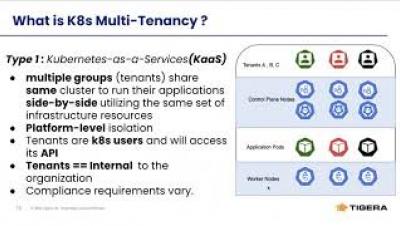
How Calico Enterprise Enables Your Kubernetes Multi-Tenancy

In this talk, we will explore Kubernetes multi tenancy concepts and design patterns. Specifically, we will go over the network and network security design patterns needed for enabling multi tenancy within your k8s clusters using key capabilities of Calico Enterprise. Explore multi-tenancy use-cases in Kubernetes Learn about the core concepts and design patterns behind multi tenancy in Kubernetes Understand the key capabilities of Calico and Calico Enterprise that enable multi tenancy

SquaredUp for SCOM - Quick Win Video Series - Part 1: Dashboard Designer

If you are new to SquaredUp, and just need a little helping hand getting started, this Quick Win Video Series is for you! In this series we take you through some of the fundamentals of building and designing your own dashboards. We look at some of the tile types and visualizations that are available, show you how to run SCOM agent tasks from SquaredUp, and finish up with an example of using a SquaredUp dashboard to troubleshoot an issue.

SquaredUp for SCOM - Quick Win Video Series - Part 2: Alerts Tile

In this series we take you through some of the fundamentals of building and designing your own dashboards. We look at some of the tile types and visualizations that are available, show you how to run SCOM agent tasks from SquaredUp, and finish up with an example of using a SquaredUp dashboard to troubleshoot an issue. This video focuses on the Alerts Tile. We’ll discuss monitor and rule alerts and show you how to scope both a Donut and List Alerts tile.

SquaredUp for SCOM - Quick Win Video Series - Part 3: Status Tile

In this series we take you through some of the fundamentals of building and designing your own dashboards. We look at some of the tile types and visualizations that are available, show you how to run SCOM agent tasks from SquaredUp, and finish up with an example of using a SquaredUp dashboard to troubleshoot an issue. This video focuses on the Status Tile. We’ll show you how to scope Donut, Blocks, and Icons Status tiles, including a brief look at how to add custom labels.

SquaredUp for SCOM - Quick Win Video Series - Part 4: TopN Performance

In this series we take you through some of the fundamentals of building and designing your own dashboards. We look at some of the tile types and visualizations that are available, show you how to run SCOM agent tasks from SquaredUp, and finish up with an example of using a SquaredUp dashboard to troubleshoot an issue. This video focuses on TopN scoped Performance tiles. We’ll show you how to scope a Bar Top N Performance tile, and also how to clone and edit a tile.

SquaredUp for SCOM - Quick Win Video Series - Part 5: Dashboard Actions

In this series we take you through some of the fundamentals of building and designing your own dashboards. We look at some of the tile types and visualizations that are available, show you how to run SCOM agent tasks from SquaredUp, and finish up with an example of using a SquaredUp dashboard to troubleshoot an issue. This video focuses on the dashboard actions feature. We’ll show you how to configure actions, including running SCOM tasks, and adding external and internal links.