Operations | Monitoring | ITSM | DevOps | Cloud


The latest News and Information on Incident Management, On-Call, Incident Response and related technologies.

Getting Started with Playbooks
It’s 2022: You’re good at your job, you’re maintaining modern systems, now you want to level up your team based on a solid foundation of their collective expertise. You want to standardize and centralize process documentation and make execution as easy and effective as possible so that everything runs smoothly, every time.

What's New: Updates to Event Intelligence, On-Call Management, Automation, Mobile, and More!
We’re excited to announce a new set of updates and enhancements to the PagerDuty platform. Recent updates from the product team include On-Call Management, Event Intelligence, and Mobile Products, to PagerDuty Community & Advocacy Events.
Reliability Through Automation for Your Infrastructure and Applications at Scale

Intelligent Service Design
Hello and welcome to the fourth post in our EI Architecture series focusing on Intelligent Alert Grouping. Previously we have talked about how to train Intelligent Alert Grouping using incident merges (here) and how to configure your alert titles to improve default matching. In this post, we’re going to cover how service design can also impact your experience with Intelligent Alert Grouping as well as the PagerDuty app in general.

Training Intelligent Alert Grouping
We’re continuing on with our third piece about how to utilize and improve your Intelligent Alert Grouping (IAG)! In case you missed it, the first two blog posts describe the feature (here) and explain how it uses merging to group alerts (here). We alluded to today’s post at the end of last: today we’ll be discussing how to use alert titles to improve IAG matches.

What Your System Outage Notifications Need To Say
System outages happen to the best of us. Communicating with your customers and other stakeholders effectively during downtimes is vital to maintaining a solid relationship with them. When a system outage occurs, technical teams are tasked with swiftly locating the cause and resolving the issue, while communications teams are tasked with notifying stakeholders and customers about the outage to maintain transparency.
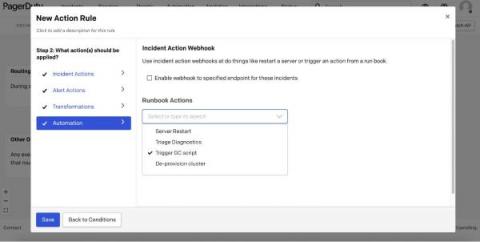
Using Event Orchestration to reduce noise and trigger next best action
We often hear from customers that they’re dealing with unmanageable levels of noise and complexity, which makes it harder to pinpoint root cause and get to resolution quickly. All this effort spent on sifting through noise, processing events, and gathering context results in a lot of wasted time. That’s why we’ve launched Event Orchestration, which became generally available to our Event Intelligence and Digital Operations customers on Monday.
Announcing our newest integration: Confluence
Using FireHydrant’s Runbooks, incident and retro data can be automatically sent to Confluence at any point in the incident lifecycle. For example, the moment you’ve resolved an incident FireHydrant can create a fresh Confluence page with all of the critical incident information stored in FireHydrant. When utilizing Runbook conditions, you can choose the perfect moment to send your FireHydrant retro to a Confluence workspace.