Operations | Monitoring | ITSM | DevOps | Cloud

Codefresh vs. GitlabCI

If you have selected Gitlab as your git provider, you may automatically think about selecting GitlabCI as your CI/CD solution as well. Using the same vendor for source control and CI/CD might seem natural, but is not always the best combination. In fact, choosing a “good-enough” option just because it is part of the same solution is unwise in the long run if it doesn’t cover your needs.


Fantastic CMDBs and How to Find Them

J.K. Rowling created a book in 2001 based off a small series of books that you may have heard of (Harry Potter, in case you didn’t get the subtle hint) called Fantastic Beasts and Where to Find Them. The book acts as a reference and guidebook for all the mythical creatures that you find in the Harry Potter world. It’s a textbook that is even referenced in the Harry Potter films as something the main characters must study.

Introducing the enrich processor for Elasticsearch ingest nodes

As part of Elasticsearch 7.5.0, a new ingest processor — named enrich processor — was released. This new processor allows ingest node to enrich documents being ingested with additional data from reference data sets. This opens up a new world of possibilities for ingest nodes.

How to Maintain Uptime During the Holidays

It’s that time of year again. Forget turkey, cranberries and pesky in-laws: it’s time to get your shopping on. For IT organizations at retailers and e-commerce companies, it’s an exciting time and also one where every detail matters. So far, predictions are robust for sales, with eMarketer forecasting that this will be the first-ever trillion-dollar holiday season in the United States. U.S.

All The Logs For All The Intelligence

If you are reading this, I don’t have to convince you any further of the powerful intelligence we can derive from logs and machine data. If you are anything like the many, many users, customers and prospects we have been talking to over the years, you might, however, have some level of that pesky modern condition commonly known as volume anxiety. The volume here, of course, is the volume of data––there is a lot of it, and it keeps growing.

Ingesting Cloudtrail Logs with the Graylog AWS Plugin

Cloudtrail logs provide excellent insight into how your AWS account is being used. They record all activity by the web console, SDKs, and APIs. With help from the AWS plugin, getting this information into Graylog is easier than ever. In this blog post you'll set up the required AWS resources, configure the Graylog input, and do some basic searches to explore its capabilities.

Heightened visibility & deeper control with a monitoring control plane

Until a few years ago, if you did any kind of searching for control planes, you would have found results related to traditional networking concepts. With the advent of cloud computing — including hybrid cloud, multi-cloud, and cloud-native — we’re seeing a lot of tools starting to adopt a “control plane for 'X'” terminology. We’ve heard this term applied to — among other things — Kubernetes. More on that later.

Best practices for managing alerts with Slack and Opsgenie

When Opsgenie and Slack team up, incident management is smoother and more intuitive. With this powerful integration, users are enabled to rapidly respond to and resolve alerts directly from Slack, using buttons or /genie commands to mute notifications, get alert details, view on-call schedules, and much more. Here are some best practices to help teams avoid alert fatigue but always stay informed.

How to Do Automatic Annotations with Grafana and Loki

Grafana annotations are great! They clearly mark the occurrence of an event to help operators and devs correlate events with metrics. You may not be aware of this, but Grafana can automatically annotate graphs by querying Loki. Here’s a look at how to use this feature. Loki queries can be used to automatically generate annotations on Grafana dashboards since 6.4.0. For every log line that is returned from a query, the text is automatically displayed as an annotation at the appropriate time.

Disable EBS Fast Snapshot Restores Action

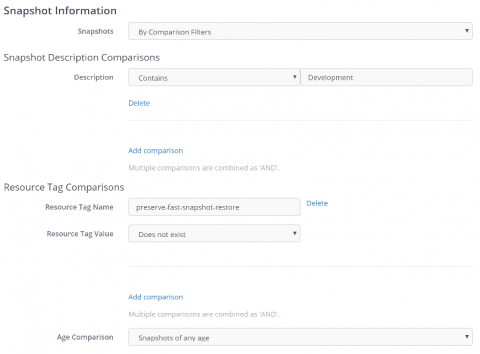
A few weeks ago, Amazon announced a new feature for EBS snapshots: Amazon EBS Fast Snapshot Restore (FSR). Normally, accessing data on new EBS volumes was quite slow as the data is lazy-loaded from S3. When Fast Snapshot Restore (FSR) has been enabled on an EBS snapshot, new EBS volumes created from that snapshot will allow fast data access. While this feature is very good, it’s very expensive to keep enabled on an EBS snapshot for a long time.