Quickly developing REST APIs with PostgREST
Setting up an HTTP interface to a database can be a lot of work. Read on to see how PostgREST makes it quick and simple to provide RESTful access to PostgreSQL®.


For many years, system uptime was the primary measure of reliability, especially when the most popular method of running software was on bare metal, on-premises servers. If a server was shutdown, rebooted, or otherwise became unavailable, downtime was expected until a system administrator could manually restart it.
After the global pandemic and lockdowns, most businesses look onward to online solutions for their applications. They want to take their business online by creating mobile or web applications. Companies are looking to monitor every aspect of the application, including deployment, bugs, API failures, etc. But the most important thing is how the application behaves when it goes into the hands of the end-users.
With hybrid work environments on the rise, enterprise networks are dealing with multiple remote connections, increasing the risk of breaches and other attacks. One way to mitigate these risks is by implementing Zero Trust Architecture (ZTA) into the enterprise network. Unfortunately however this does not address the full set of threats to the enterprise, as many of the zero-trust service providers and on-premises network solutions do not address the voice network.
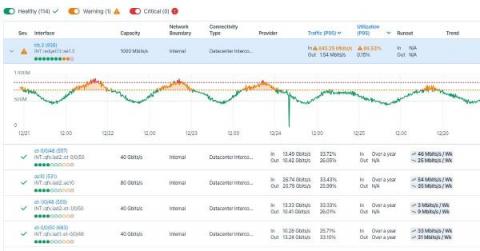
Didn’t quite get to that task of capacity planning in December? Well, not to worry, this month Kentik has overhauled our Capacity Planning workflow and is introducing a slew of new features to make capacity planning easier and more intuitive than ever before. Those who are familiar with Kentik will know that one of our core offerings is the ability to monitor and plan actual network and interface utilization.
In the last few years, many organizations I worked with have significantly increased their cloud footprint. I’ve also seen a large percentage of newly launched companies go with cloud services almost exclusively, limiting their on-premises infrastructure to what cannot be done in the cloud — things like WiFi access points in offices or point of sale (POS) hardware for physical stores.
Thomas Stringer has a couple of great blog posts on how to understand your Azure monitoring costs and also on how to reduce your costs, see Azure Monitor Log Analytics too Expensive? Part 2 – Save Some Money | Thomas Stringer (trstringer.com). In the past I’ve blogged on How to calculate the Azure Monitor and Log Analytics costs associated with AVD (not an easy task!).
We are proud of our many customers and users around the globe that trust Icinga for critical infrastructure monitoring. That´s why we´re now showcasing some of these enterprises with their Success stories. It´s stories from companies or organizations just like yours, of any size and different kinds of industries. Some of them are our long-standing customers, others have just recently profited from migrating from another solution to Icinga.
You need not fear a long-lived streaming workload. A few simple tricks can transform a request that may not ever terminate for hours or days into something you can get regular health and status updates on. We in fact have one of those continuous processing services—Beagle, our Service Level Objective stream processor—which we’ve instrumented in this fashion.