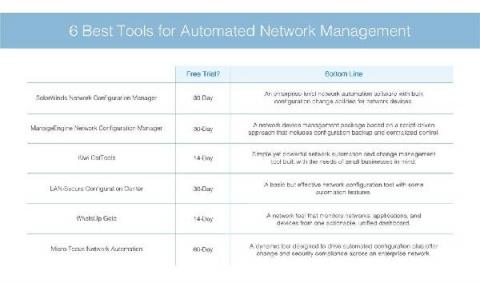
This blog is the first in a four-part series on infrastructure automation for government agencies that are modernizing digital systems while grappling with budget and staffing constraints and the challenges of COVID-19. The last 12 months have been a turning point for many government agencies. The COVID-19 pandemic has accelerated the drive towards modernization and, with it, the need to ensure security and compliance requirements across a host of legacy systems and processes.
Virtual machines (VM) offer great flexibility for hosting web applications. A developer/engineer is able to configure and control every piece of software and every setting that the application needs to run. Azure, one of the largest cloud hosting platforms, has virtual machine offerings for both Linux and Windows-based operating systems. In this tutorial, you will learn how to set up a continuous deployment pipeline to deploy a Node.js application to an Azure virtual machine.
In the first article in this series, you learned how to set up your developer environment, the first step toward creating your very own Mattermost plugins. Take my word for it: Your first attempts at writing Mattermost plugins can be quite confusing. Where do you start? What do you have to do to get your first plugin up and running? At the end of this series, you’ll be well on your way to writing your own plugin.
Magisk is a very sophisticated systemless rooting technique that can bypass Google's SafetyNet attestation and allow apps like Google Pay, many banking apps, and even Fortnite and Pokémon Go games to be installed on a rooted Android device. Rooting an Android device is popular to allow the user to customize and tweak their device by allowing the installation of third-party apps and tools, removavl of bloatware, and speed up the processor and network.
Ivanti User Workspace Manager (UWM) 2021.1 is a major release focused on quality, stability and several feature enhancements. As of version 2021.1, Application Control offers a native user interface inside the AC console. This interface presents an aggregated view of events captured from all managed endpoints. The events are filtered and categorized on a per-feature basis and can be seamlessly translated into policy actions via drag-and-drop functionality.