Operations | Monitoring | ITSM | DevOps | Cloud

Monitor, Troubleshoot, and Optimize Your Virtual Environment With SolarWinds Virtualization Manager

SolarWinds® Virtualization Manager (VMAN) is a vendor-agnostic monitoring tool designed to provide alerting and performance recommendations for VMware vSphere®, Microsoft Hyper-V®, Nutanix® AHV, and both Azure® and AWS® IaaS environments. See how Virtualization Manager can help you optimize and tune your virtual environment.

How AppSignal Monitors Their Own Kafka Brokers

Today, we dip our toes into collecting custom metrics with a standalone agent. We’ll be taking our own Kafka brokers and using the StatsD protocol to get the metrics into AppSignal. This post is for those with some experience in using monitoring tools, and who want to take monitoring to every corner of their architecture, or want to add their own metrics to their monitoring setup.

Automating MSP Client Onboarding with LogicMonitor

Automating client onboarding can eliminate the tedious task of cloning dashboards, creating group directory structure, setting up reports, and configuring access roles. All of these tasks are prone to human error and to put it mildly, not really fun to do. In this blog, we’ll walk through a PowerShell script to automate some of these tasks.

How to Manage Datadog Resources Using Terraform | Datadog Tips & Tricks

Terraform allows you to efficiently manage complex infrastructure environments, and Datadog is an important piece of those environments. With the Datadog provider, you can use Terraform to manage your Datadog resources as code, allowing you to create and edit resources with the same tool you’re already using for your infrastructure. This video will show you how to do just that through the example of creating a Datadog monitor.

How to Build A Unified Dashboard | Datadog Tips & Tricks

In this video, you’ll learn how to create unified dashboards to enable your teams with valuable information and performance visualizations from across the Datadog platform. Dashboards allow your teams to see all data from across the Datadog platform side-by-side, enabling holistic visibility and breaking down silos between Dev and Ops teams. In this video, you’ll learn how to create a Screenboard, showcasing data such as frontend system latency, backend system latency, and Service Level Objectives all in one place.

Identifying Environment Right Sizing Opportunities for Cost Efficiency | Datadog Tips & Tricks

In this video, you’ll learn how to use the host map to identify opportunities to rightsize your environment to become more cost efficient. MoneySuperMarket Group was able to cut their cloud infrastructure costs by over 50% by utilizing Datadog. This video unpacks some of the practices used by MoneySuperMarket’s engineering team to accomplish that.

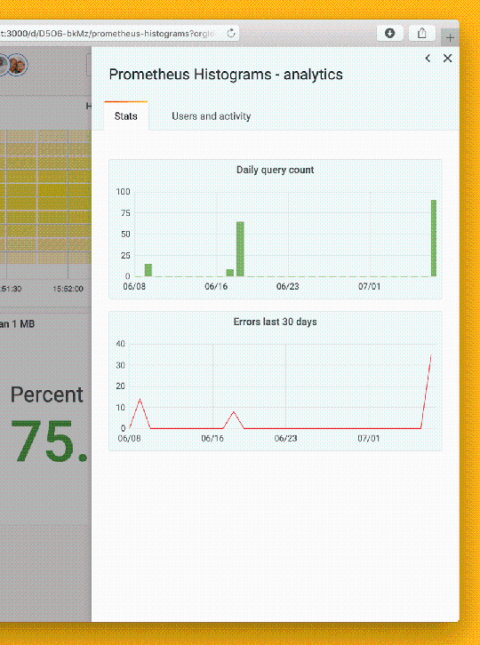
New Enterprise features in Grafana 7.0: Usage insights and user presence indicator

Dashboard sprawl is a real problem whether you’re using Grafana or any other tool. When growing to thousands of users – and as many dashboards – you’ll eventually want more information about how the tool is being used in your organization. After all, dashboards don’t help anyone if they aren’t being used. Managing large installations is one of the areas where Grafana Enterprise improves Grafana, and our launch of usage insights in 7.0 is a key part of that.

User interface design and its importance in the user experience

A product’s user experience consists of the before, during, and after of a user’s interactions with it, or more precisely, their expectation, satisfaction, and fulfilment. Experience can be influenced by anything from marketing materials, product reviews, interaction with sales, through to cost, installation and onboarding process, product stability, post-sales support, and numerous other factors. So it’s clear that creating a positive experience is a collective responsibility.